

· 11 min read
Engineering a Hybrid AI System with Chrome’s Built‑in AI and the Cloud
Learn how to build production-ready AI features that adapt seamlessly between Chrome's local Gemini Nano and cloud models. Based on building the DocuMentor AI Chrome extension, this deep dive covers provider abstraction, Chrome AI resource management, execution patterns for local vs cloud, and graceful fallback systems.

Agents are easier to build with a spec. Work yours out with Agentailor, then hand it to your agent.
Get a handoff briefBuilding AI-powered applications just got more interesting. With Chrome's new built-in AI running 100% locally, we're no longer just tweaking prompts; we're designing systems that span local AI (private but resource-constrained) and cloud AI (powerful but expensive).
I recently built DocuMentor AI, a Chrome extension that helps developers learn from technical content. It ships AI-powered smart summaries, video recommendations, and personalized explanations, and in production it runs on both Chrome's built-in Gemini Nano and a cloud AI backend, automatically adapting to what each environment does best.
If you're building AI features in the browser (extensions, dev tools, or web apps), this is the architecture I wish I had before wiring Chrome's local models to a cloud stack.
We'll break down the production patterns that made this hybrid system work: feature-based provider abstractions, intelligent routing between local and cloud, resource management for Chrome's constraints, and graceful degradation strategies you can reuse in your own Chrome AI projects.
Why Hybrid AI Architecture Matters
Chrome's built-in AI (Gemini Nano) runs locally in the browser, offering zero-latency inference and complete privacy. The tradeoff: strict resource constraints—limited context windows (~2K-4K tokens), sequential execution to avoid crashes, and dependency on device VRAM.
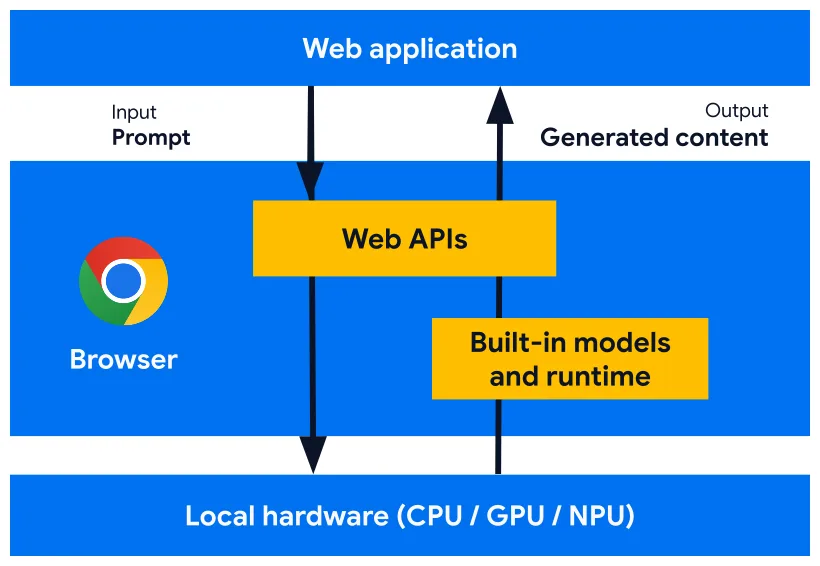 Figure: Chrome's built-in AI runs entirely on-device, leveraging local GPU/CPU resources.
Local vs Cloud Tradeoffs
| Dimension | Chrome local AI (Gemini Nano) | Cloud AI models |
|---|---|---|
| Privacy | Data stays on device | Data sent to remote servers |
| Latency | Instant on GPU, slow on weak CPUs | Network latency, but stable compute |
| Capacity | Tight context & VRAM limits | Large context windows, higher cost |
Figure: Key tradeoffs between local and cloud AI models.
This creates an architectural challenge: we're no longer just managing API calls, we're orchestrating two fundamentally different compute environments. The key is routing fast, privacy-sensitive tasks locally while reserving cloud AI for complex reasoning and large contexts.
The challenge: build one application that leverages the best of both worlds and gracefully adapts based on which provider is available.
Next, let's look at how DocuMentor AI is structured around this constraint.
The DocuMentor AI System
DocuMentor AI is a Chrome extension that analyzes technical content in a sidebar—no prompts required. When you open a doc, blog post, or API reference, it quietly runs a few AI pipelines against the page.
The extension exposes two main modes (see illustration above): Quick Scan for instant insight and Deep Analysis for deeper, multi-step workflows.
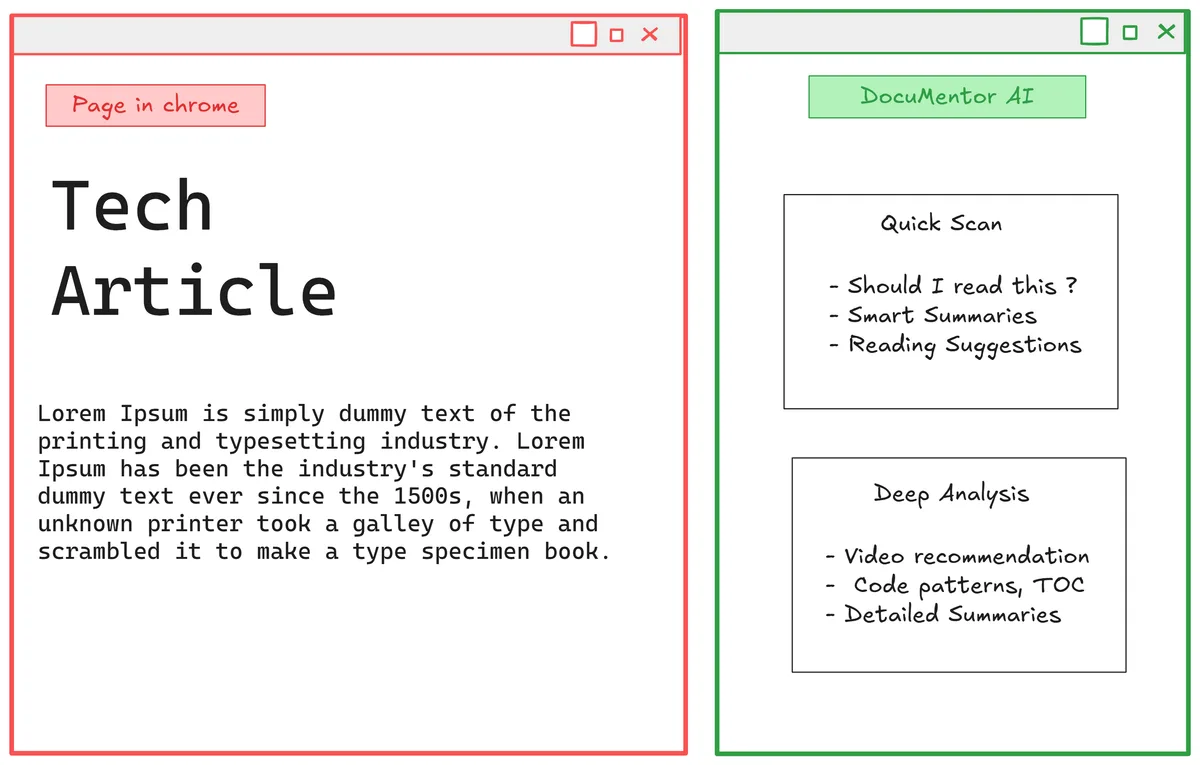 Figure: Quick Scan handles lightweight, instant insights; Deep Analysis runs heavier, multi-step workflows.
The architectural challenge: on GPU-equipped machines, Gemini Nano delivers these results almost instantly. On CPU-only devices, the same Deep Analysis workflow can take 60+ seconds. The cloud backend acts as a performance tier, around 7 seconds instead of a minute on slower hardware.
The core design decision: run everything locally by default, and fall back to cloud for performance, not capability. Users get privacy-first behavior out of the box, with cloud only stepping in when local would be unreasonably slow.
Abstracting AI Providers: The Unified Interface
The first architectural challenge: Chrome's built-in AI doesn't work like traditional LLM APIs. Instead of one generic completion endpoint, Chrome provides specialized APIs optimized for specific tasks:
- Summarizer API: Purpose-built for summarization with format options (markdown, plaintext) and types (tl;dr, key-points)
- Writer API: Optimized for generating new content (used for cheat sheet generation)
- Prompt API (LanguageModel): General-purpose chat for everything else (recommendations, explanations)
Cloud providers like OpenAI or Gemini offer one API with prompt engineering handling all use cases. This mismatch makes a naive abstraction impossible, you can't just swap openai.chat.completions.create() with window.Summarizer.summarize().
Note: The code snippets below are simplified for clarity; the actual implementation includes error handling, type definitions, and other production concerns.
Feature-Based Interface Design
The solution: design the interface around features, not API methods. Instead of forcing everything through a generic generate() method, expose the operations your application actually needs:
export type AvailabilityStatus = 'available' | 'unavailable' | 'downloadable' | 'downloading'
export interface BaseAIProvider {
  readonly type: ProviderType

  isAvailable(): Promise<AvailabilityStatus>
  initialize(config?: ProviderConfig): Promise<void>

  // Feature methods
  executePrompt(messages: ChatMessage[], options?: PromptOptions): Promise<string>
  summarize(text: string, options?: SummarizeOptions): Promise<string>
  write(text: WriteContent, options?: WriteOptions): Promise<string>
}
This interface maps naturally to Chrome's specialized APIs while remaining implementable by cloud providers.
Chrome AI Implementation
The local provider delegates to Chrome's specialized APIs:
export class GeminiNanoProvider implements BaseAIProvider {
  readonly type = 'local'

  async isAvailable(): Promise<AvailabilityStatus> {
    // Chrome exposes a unified availability() check on each AI API
    const summarizer = await window.Summarizer?.availability()
    const languageModel = await window.LanguageModel?.availability()
    const writer = await window.Writer?.availability()

    // Returns simplified status – adapt to your actual shape
    return { summarizer, languageModel, writer }
  }

  async summarize(text: string, options?: SummarizeOptions): Promise<string> {
    // TODO: add availability check here as well
    const summarizer = await window.Summarizer.create(options)
    return await summarizer.summarize(text)
  }

  async executePrompt(messages: ChatMessage[], options?: PromptOptions): Promise<string> {
    // Use general-purpose Prompt API for chat / recommendations
    const session = await window.LanguageModel.create({ outputLanguage: 'en' })
    const systemPrompt = 'Defined system prompt based on options'
    return await session.prompt(systemPrompt, messages)
  }

  async write(text: WriteContent, options?: WriteOptions): Promise<string> {
    // Use Writer API for content generation (cheat sheets)
    const writer = await window.Writer.create(options)
    return await writer.write(text.prompt)
  }
}
Cloud Provider Implementation
The cloud provider implements the same interface but routes everything to a single LLM with prompt engineering using a backend API:
export class DocumentorAIProvider implements BaseAIProvider {
  readonly type = 'cloud'

  async isAvailable(): Promise<AvailabilityStatus> {
    // Cloud assumed available while network is up
    return { summarizer: 'available', languageModel: 'available', writer: 'available' }
  }

  async summarize(text: string, options?: SummarizeOptions): Promise<string> {
    // Replicate Summarizer behavior via backend + prompt engineering
    const response = await apiClient(this.apiConfig, '/summarize', { text, options })

    if (!response.ok) {
      console.warn(`Documentor AI  /summarize returned status: ${response.status}`)
      return this.fallbackProvider.summarize(text, options)
    }

    return await response.text()
  }

  async executePrompt(messages: ChatMessage[], options?: PromptOptions): Promise<string> {
    // Delegate general prompts to backend
    const response = await apiClient(this.apiConfig, '/prompt', { messages, options })

    if (!response.ok) {
      console.warn(`Documentor AI  /prompt returned status: ${response.status}`)
      return this.fallbackProvider.executePrompt(messages, options)
    }

    return await response.text()
  }

  async write(text: WriteContent, options?: WriteOptions): Promise<string> {
    // Delegate writing tasks to backend
    const response = await apiClient(this.apiConfig, '/write', { text, options })

    if (!response.ok) {
      console.warn(`Documentor AI  /write returned status: ${response.status}`)
      return this.fallbackProvider.write(text, options)
    }

    return await response.text()
  }
}
The challenge: Replicating Chrome's specialized APIs with prompt engineering took extensive iteration. Chrome's Summarizer API sometimes produces better summaries than Gemini 2.5 Flash with custom prompts—it's genuinely optimized, not just a wrapper.
Provider Factory
Provider selection is straightforward: authenticated users get cloud performance, unauthenticated users get local privacy:
export class AIProviderFactory {
  static async createProvider(): Promise<BaseAIProvider> {
    const isAuthenticated = await checkAuthStatus() // Auth0 integration

    if (isAuthenticated) {
      const provider = new DocumentorAIProvider()
      await provider.initialize({ apiKey: getApiKey() })
      return provider
    }

    // Default to local AI for privacy
    const provider = new GeminiNanoProvider()
    await provider.initialize()
    return provider
  }
}
No runtime switching, users must sign out to change providers. This simplifies state management and avoids mid-session provider transitions.
Adapting to Model Capabilities: Two Strategies
Once you have a unified interface, the next challenge emerges: not all models can execute the same workflows. Chrome's Gemini Nano technically supports tool calling, but its reasoning capacity makes complex multi-step operations unreliable.
The Video Recommendation Problem
DocuMentor's video recommendation feature illustrates this perfectly. The ideal workflow:
- Analyze the page summary and generate an optimal YouTube search query
- Call the YouTube Data API v3 tool (returns up to 10 videos)
- Analyze each video's relevance to the user's goals and current content
- Rewrite descriptions to be more compelling
- Return the top 3 videos, ranked by relevance
This is straightforward for cloud models—one prompt, one tool call, done in 10-20 seconds. For Gemini Nano, it was a disaster.
What happened with Gemini Nano:
- Hallucinated video URLs instead of calling the tool
- Sometimes ignored the tool entirely and invented results
- When it did work, took 2+ minutes to complete
- Inconsistent structured output (malformed JSON)
The model simply couldn't maintain context through multiple reasoning steps while coordinating tool execution and adhering to strict output schemas.
Architecturally, this is the core difference between local and cloud AI in DocuMentor: cloud models can act as both planner and executor in a single call, while local AI forces the extension to take over orchestration and delegate only narrow reasoning tasks to the model.
Strategy 1: Sequential Decomposition (Local AI)
The solution for Chrome AI: break the workflow into discrete, atomic operations:
async function getVideoRecommendationsLocal(pageSummary: string, userPersona: UserPersona) {
  // Step 1: Generate search query (isolated reasoning task)
  const searchQuery = await provider.executePrompt(/* search query generation */)

  // Step 2: Manual API call (no tool calling complexity)
  const rawVideos = await searchYouTube(searchQuery, { maxResults: 10 })

  // Step 3: Filter to essential data before next AI call
  const filteredVideos = rawVideos.map((v) => ({
    /*important fields*/
  }))

  // Step 4: Rank and select (second isolated reasoning task)
  const rankingResponse = await provider.executePrompt(/* ranking prompt */)

  // Step 5: Parse with fallback (structured output isn't reliable, code omitted)
  return JSON.parse(rankingResponse)
}
Key pattern: one reasoning task per prompt, manual tool execution, aggressive filtering before each AI call, and defensive JSON parsing. Each prompt is short, with tightly bounded context, which keeps Gemini Nano within quota limits and reduces the chance of it “forgetting” prior steps. Total time: ~60 seconds on CPU devices, ~15 seconds on GPU devices.
Strategy 2: Tool-Augmented Single Call (Cloud AI)
The cloud implementation leverages proper tool calling and complex reasoning:
async function getVideoRecommendationsCloud(pageSummary: string, userPersona: UserPersona) {
  // Simplified tool definition
  const tools = [{
    name: 'search_youtube',
    description: 'Search YouTube videos',
    function: async (args) => await searchYouTube(args.query, { maxResults: args.maxResults })
  }];

  const response = await provider.executePromptWithTools(
    /* Single prompt: analyze, search, rank, and format */,
    { tools }
  );

  return JSON.parse(response); // Cloud models reliably return structured output
}
Here the cloud model effectively acts as both planner and executor: it decides when to call the search_youtube tool, how many results to inspect, how to score relevance, and how to format the final JSON. Because the model can reliably maintain long context and follow tool-calling protocols, a single end-to-end call is both simpler and more robust than hand-orchestrated steps.
Decision Framework
| Strategy | When to Use |
|---|---|
| Sequential decomposition | You're running on local AI; workflows involve multiple reasoning steps or tool calls; context windows are tight (under ~4K tokens) or quota is unpredictable. |
| Tool-augmented single calls | You're on cloud AI with strong tool-calling support; you need end-to-end reasoning in one request; structured output reliability is critical. |
Figure: Decision Framework.
In practice, this becomes an architectural decision about where orchestration lives: in your application code for local AI, or inside the model for cloud AI.
Structured Output Considerations
Chrome AI's structured output support is inconsistent. Even when prompted for JSON:
- Results may be wrapped in markdown code blocks
- Field names might be slightly different than requested
- Entire response might be valid JSON 90% of the time, malformed 10%
Defense strategy:
For local AI, I added a lightweight repair layer around JSON.parse to double-check and fix model responses before using them. If parsing still fails, triggers a constrained retry prompt. Cloud models rarely need this fallback logic.
Performance vs Capability Tradeoff
The sequential approach is slower but necessary for local AI reliability. The tool-augmented approach is faster and cleaner but depends on cloud inference and network availability.
In production, DocuMentor uses the provider type to automatically select the appropriate strategy—users never see the complexity, just results that work regardless of which AI is executing. This pattern has become our default template for any feature that relies on tools and multi-step reasoning.
Resource Management: Execution, Tokens, and Content Optimization
Chrome AI's resource constraints require careful management at multiple levels: execution timing, token budgets, and content size.
Sequential Execution Wins
Counterintuitively, Promise.all() (and its variants) for parallel calls was slower than sequential execution. Running multiple LanguageModel sessions simultaneously appears to compete for device resources, degrading performance on both CPU and GPU systems.
The solution: sequential execution with smart UX ordering—return the fastest, highest-value result first so users always have something to read while heavier operations run. For Quick Scan:
async function executeQuickScan(pageContent: string, userPersona: UserPersona) {
  // Start with fastest, most valuable insight
  const tldr = await provider.summarize(pageContent, { type: 'tl;dr' })
  displayToUser(tldr) // User reads while next operation runs

  const shouldRead = await provider.executePrompt(/* recommendation logic */)
  displayToUser(shouldRead)

  const learnResources = await provider.executePrompt(/* link analysis */)
  displayToUser(learnResources)
}
By the time users finish reading the TL;DR, the next result is ready. Sequential execution feels faster than parallel because results stream in progressively.
Token Budget Management
Chrome AI provides built-in quota checking to prevent runtime errors:
async function safeExecuteLanguageModel(text: string) {
  const session = await window.LanguageModel.create()
  // Check if input fits within quota
  const inputTokens = await session.measureInputUsage(text)
  const availableQuota = session.inputQuota // Typically ~4000 tokens
  if (inputTokens > availableQuota) {
    // Fallback: truncate
    text = truncateToFit(text, availableQuota)
  }
  return await session.prompt(text)
}
All the built-in APIs expose identical measureInputUsage() and inputQuota properties, making quota checks consistent.
Content Extraction and Truncation
Raw page content often exceeds Chrome AI's context window. DocuMentor uses a two-tier extraction strategy:
async function extractPageContent(url: string): Promise<string> {
  // Primary: Mozilla Readability for clean content extraction
  const readable = new Readability(document.cloneNode(true)).parse()

  if (readable?.textContent) {
    return truncateContent(readable.textContent, MAX_CONTENT_LENGTH)
  }

  // Fallback: Custom DOM extraction
  const fallbackContent = extractFromDOM(document.body)
  return truncateContent(fallbackContent, MAX_CONTENT_LENGTH)
}
15K characters is the hard limit, enough context for meaningful analysis while staying well within Chrome AI's token budget. Through testing, this emerged as the sweet spot: large enough to preserve nuance, small enough to avoid quota errors on lower-end devices. Readability removes boilerplate (navigation, ads, footers), ensuring the 15K contains actual content.
Cloud vs Local Strategy
Cloud providers don't need these constraints. But for performance and security purposes, I still apply limit on page content for the Documentor AI backend provider as well.
Graceful Degradation & Fallback Systems
The hybrid architecture only proves itself when things go wrong. Network failures, quota limits, and backend errors are inevitable, the system’s reliability depends on how it degrades.
Simple Fallback Chain
DocuMentor uses a straightforward hierarchy:
- Cloud AI (Documentor AI backend)
- Local AI (Chrome Gemini Nano)
- Error (as a last resort)
When the cloud path fails for any reason, network outage, 5xx, or quota exceeded, the extension silently falls back to Chrome’s local AI:
async function runWithFallback(request: AIRequest) {
  try {
    return await cloudProvider.execute(request)
  } catch (error) {
    console.warn('Cloud provider failed, falling back to local AI', error)
    return await localProvider.execute(request)
  }
}
On the backend, each user gets a 20 requests/day limit. Hitting that limit returns a quota error, which is treated just like any other failure and triggers the same fallback.
Silent Fallback, Not Error Popups
Fallback is intentionally silent. When users exhaust cloud quota or hit a transient error, the feature still works using local AI, it just responds slower (≈60s vs ≈7s). The UI shows the same generic loading state regardless of which provider is active; surfacing “Cloud quota exceeded, switching to local AI” doesn’t help, because users can’t fix it and the only real difference is latency.
Lessons Learned & Best Practices
Most of the heavy lifting was covered earlier; these are the patterns I’d reuse on the next hybrid Chrome AI project:
- Prefer sequential over parallel: Multiple Chrome AI sessions in parallel often ran slower and contended for resources.
- Use specialized APIs first: Purpose-built APIs sometimes beat generic LanguageModel. Start with these and fall back to generic chat only when you hit their limits.
- Keep orchestration out of weak models: Let strong cloud models plan and execute multi-step tool workflows in a single call;
- Cap and defend I/O: Enforce a content cap for both local and cloud providers, and always treat JSON output as untrusted and retry with tighter constraints when needed.
Conclusion
Building hybrid AI systems means rethinking where application logic lives. To make the experience truly local‑first, more intelligence has to move from the backend into the client. That unlocks privacy and offline behavior, but it also means your “backend logic” now ships in the frontend, a tension I’m still exploring how to manage cleanly.
The same abstraction carries over to mobile as well, devices running Gemini Nano on Android face the same local‑first and resource‑constraint tradeoffs.
If you want to support this work, the best way is to try DocuMentor AI, and—only if you find it genuinely useful, leave a review and share it with someone who might benefit.
This is the first public version, so feedback and improvement ideas are very welcome: edge cases you hit, workflows you’d like to see, or architecture questions it raises.
In a follow-up article, I’ll dive into the context engineering system behind DocuMentor, persona management, zero-shot feature adaptation, and dynamic prompt construction across both local and cloud providers.
If you only do one thing after this article, make it installing DocuMentor and telling me how it behaves on your setup.
Further readings and Related Articles
AGENT BRIEFINGS
Stay measured as the field moves.
What actually matters for building and scaling AI agents in production — and what's just hype. Straight from the work, no filler.
$ subscribe agent-briefings
→ what works in production, what doesn't.
→ frameworks, MCP, evals, managed services.
→ signal over hype.