

· 18 min read
How to Add Agent Skills Support to a Custom Agent Harness
Add Agent Skills support to your custom AI agent: SKILL.md discovery, progressive disclosure, tool loading, and evals, with TypeScript and Python examples.

Agents are easier to build with a spec. Work yours out with Agentailor, then hand it to your agent.
Get a handoff briefPart 5 of the Cameron series
This is one chapter of an evolving case study. Catch up on the story so far →
Ask Cameron to chart spending by category, and it has several decisions to make before there is anything to draw. Which chart fits the question? How should the query aggregate transactions? Are the amounts in dollars or cents? What can it honestly say about the result?
Those decisions need instructions. Keeping every workflow in the system prompt would make every request carry the reporting guide, including requests to log a coffee.
In Cameron v3, that guide lives in a skill. The agent sees its name and description, loads the instructions when it needs them, and uses its existing tools to do the work.
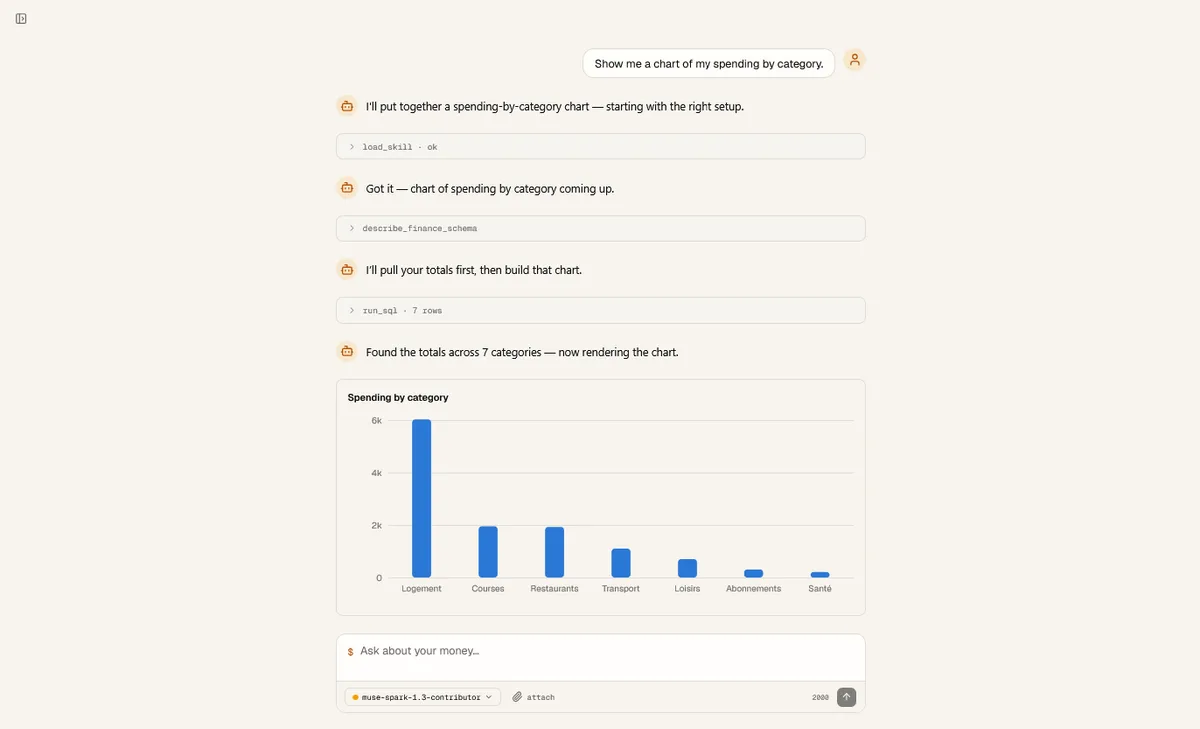 Cameron loads the reporting instructions before drawing the chart
Cameron is the personal finance agent I build in public, one release at a time. v1 established the tools and approval boundary. v2 added evals for what the agent does with those tools. This chapter adds a place for reusable workflows, then uses those evals to check whether the agent consults them.
You can apply the same pattern to an agent with a system prompt and a tool-calling loop. The guide walks through the architecture decisions, a registry, prompt integration, a loading tool, and an end-to-end check. TypeScript excerpts follow Cameron; Python equivalents illustrate the same contracts, with framework-specific registration left to your harness.
What the harness has to provide
A skill is a directory containing a SKILL.md: metadata describing its purpose, followed by instructions. The Agent Skills specification also supports optional scripts, references, and assets. The host determines which resources the agent can actually access and execute.
My earlier guide to building a skill covered authoring an expense reporter with Chart.js helpers and reference files. It assumed a host with filesystem access and a JavaScript sandbox. For Cameron, generating Chart.js code would mean maintaining an execution environment and extra execution or file-handling tools, while letting generated code vary how each chart behaves. We chose tailored UI components so the agent could focus on the question, query, and chart specification, with rendering handled by tested code.
Choose the scope before building the loader
Start with where the skill adds value. Does it teach a workflow over existing tools, execute specialized code, or help produce a user interface? SKILL.md alone is sufficient under the specification; supporting files are optional. A skill does not require a sandbox just because another agent's skills system has one.
For Cameron, the value is reporting judgment. The complete workflow lives in SKILL.md, including which tools to use. The application supplies those tools. v3 therefore supports instruction bodies, without resolving references or executing bundled scripts.
There are also two different loading decisions: what the server holds in memory, and what the model receives in context. For a small set of short skills you own, reading the files once into a registry keeps filesystem I/O and read failures out of the request path. The files remain the authoring format; the registry becomes the runtime lookup. You could also package those validated instructions into application data at build time.
Large resource bundles, frequently changing installations, and executable assets need a different policy. Keep lightweight metadata ready and retrieve resources when needed, rather than loading every asset into memory. Choose that complexity because the workload needs it.
For Cameron's instruction-only scope, the implementation has three jobs:
- Discover: read and validate the installed skills into a registry.
- Advertise: put their names and descriptions in the system prompt.
- Load: expose a tool that returns one skill's full instructions.
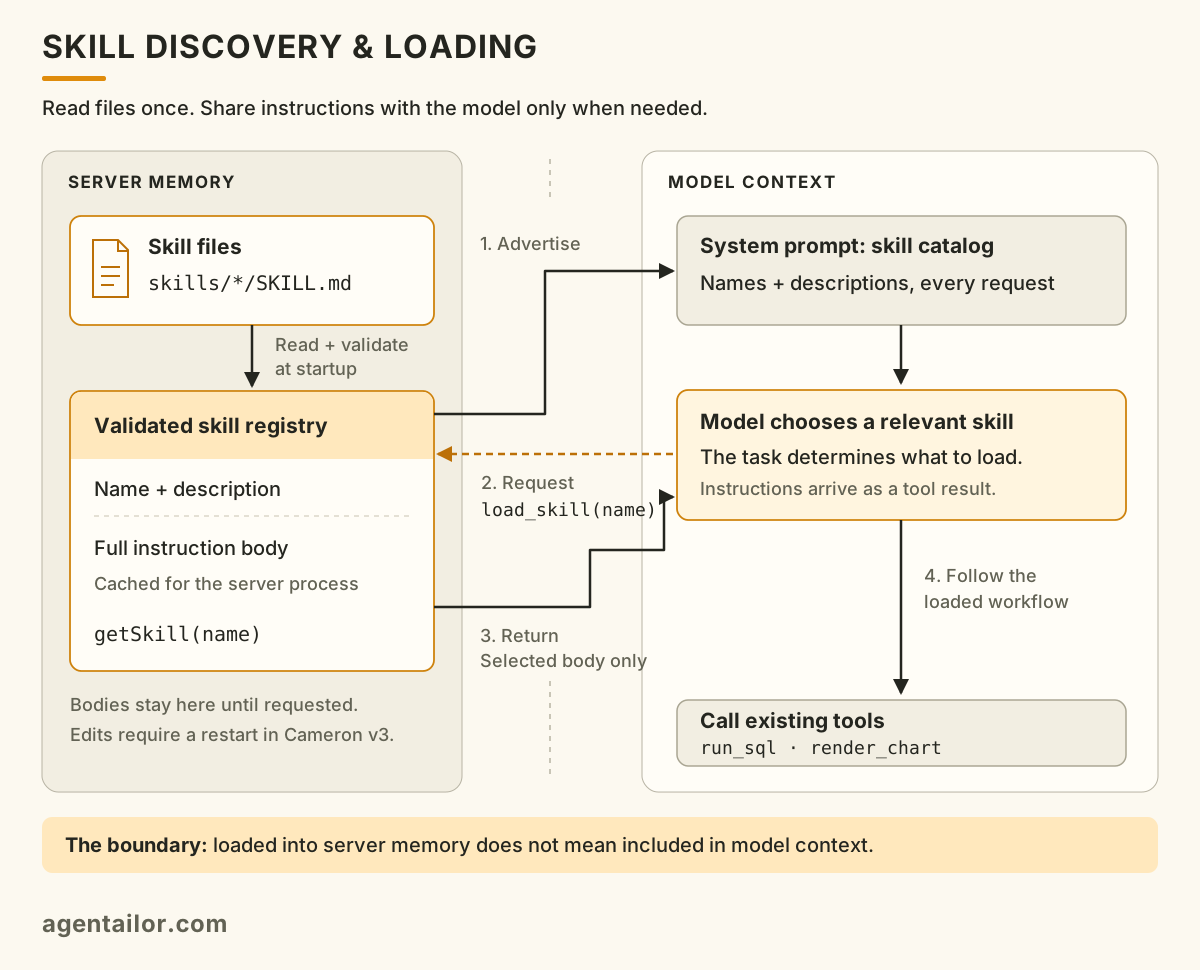
The registry holds the full instructions in server memory. Only the catalog and requested skill bodies enter model context.
Names and descriptions still consume tokens on every request. Once a body enters the conversation, it can remain in subsequent context too. Progressive disclosure avoids including every unused workflow; it does not make instructions free.
Step 1: Build a registry with an explicit failure policy
Cameron keeps application skills in the committed skills/ directory:
skills/
└── expense-reporter/
    └── SKILL.md

src/lib/skills/
├── types.ts
├── validate.ts
└── registry.ts
These are skills Cameron uses at runtime. The repository's .agents/skills/ directory contains development tooling used while writing Cameron. Keeping those locations separate prevents a coding assistant's workflow from accidentally becoming part of the finance agent's prompt.
The registry needs two views of each skill:
export interface SkillMetadata {
  name: string
  description: string
}

export interface Skill extends SkillMetadata {
  body: string
}
The prompt builder receives metadata. The loader can retrieve the body. Keeping these types in a file without filesystem imports also lets other parts of the application use them without pulling server-only code into a client bundle.
Validate before advertising
If a skill appears in the prompt, the agent should be able to load it. Validation therefore happens before registration, rather than on the first tool call.
Cameron's validator checks required names and descriptions, their length limits, the naming rules, and whether the name matches the directory. It also rejects an empty instruction body and unknown frontmatter keys. A failure returns a structured result containing the reason.
There is an implementation limit worth making explicit: v3 uses a small scalar-only frontmatter parser, not a complete YAML parser. It rejects nested mappings, including the standard's optional metadata mapping, and cannot handle multiline YAML values. Its accepted optional fields do not all have runtime semantics; allowed-tools, for example, does not configure tool permissions.
For a general-purpose host accepting third-party skills, I would use a YAML parser and validate the parsed fields against the supported contract. Cameron's committed skill fits the smaller subset. Copying that parser also means accepting that compatibility limit.
The v3 validator contains the complete rules. The registry's job is then straightforward: enumerate skill directories, read each SKILL.md, validate it, and retain successful results.
Decide what brokenness looks like
Cameron's intended policy is:
| Situation | Behavior |
|---|---|
| No skills installed | Start normally with an empty registry |
| One skill cannot be read or validated | Report the directory and reason, skip it, keep the others |
| Valid skills exist | Sort them by name before advertising them |
Stable ordering makes the skills section consistent across machines. A malformed skill should leave a useful diagnostic rather than prevent unrelated skills from loading.
There is a small gap between that policy and the v3 implementation: a catch around directory enumeration treats any enumeration failure as an empty registry. That includes permission errors, not just a missing directory. In a reusable loader, distinguish a missing directory from an unexpected read failure so deployment problems remain visible.
The registry caches the result at module initialization and exposes two functions:
export function listSkills(): SkillMetadata[] {
  return REGISTRY.skills.map(({ name, description }) => ({ name, description }))
}

export function getSkill(name: string): Skill | undefined {
  return REGISTRY.skills.find((skill) => skill.name === name)
}
The cache survives Cameron's per-turn agent construction. Its update policy is simple: adding or editing a skill requires a server restart.
Step 2: Advertise the skills in the system prompt
The agent cannot request instructions it does not know exist. Append a catalog to the base prompt, keeping the full bodies out of it.
This shortened version shows the shape of Cameron's prompt builder:
function buildSystemPrompt(skills: SkillMetadata[]): string {
  if (skills.length === 0) return SYSTEM_PROMPT

  const catalog = skills.map((skill) => `- **${skill.name}** — ${skill.description}`).join('\n')

  return `${SYSTEM_PROMPT}

Available skills:
These are instruction sets you can load on demand.
When a skill covers the kind of work you are about to do, call load_skill
with its name BEFORE starting that work, then follow its instructions.
Loading instructions does not approve any action they recommend.

${catalog}`
}
With no skills, return the base prompt unchanged. An empty heading adds noise and advertises nothing the agent can use.
The description is the routing information. Before activation, the agent sees it but cannot read any “when to use this skill” section hidden in the body. The shipped expense reporter describes requests to visualize spending, see trends, compare categories, or produce a report.
That wording carries a real decision: a reporting workflow is relevant to a trend question even when the user never says the word “report.” We will come back to what happened when the prompt left that decision underspecified.
Step 3: Add a tool that returns the instructions
load_skill accepts a name and returns the corresponding body. It does not run the workflow on the agent's behalf. The tool result enters the conversation, and the model decides its next action with those instructions available.
Here is an abbreviated version of the v3 tool, preserving its success and error payloads. The Python tab shows the handler; register it with your framework as load_skill, using a required, non-empty string input named name and the same tool description.
import { tool } from '@langchain/core/tools'
import { z } from 'zod'
import { getSkill, listSkills } from '@/lib/skills/registry'

export const loadSkill = tool(
  async ({ name }) => {
    const skill = getSkill(name)

    if (!skill) {
      return JSON.stringify({
        ok: false,
        error: 'unknown_skill',
        message: `No skill named "${name}" is loaded. See availableSkills.`,
        availableSkills: listSkills(),
      })
    }

    return JSON.stringify({
      ok: true,
      name: skill.name,
      description: skill.description,
      content: skill.body,
    })
  },
  {
    name: 'load_skill',
    description:
      'Load a skill listed in your system prompt before starting the work it covers. ' +
      'Read-only: reading instructions does not approve actions they recommend.',
    schema: z.object({
      name: z.string().min(1).describe('The exact skill name listed in the system prompt'),
    }),
  }
)
The input is a string rather than an enum generated from the installed catalog. A mistyped name then produces a recoverable tool result listing valid choices. The schema stays stable when files change and remains valid when there are no skills.
Lookup happens against validated registry entries. The model supplies a name, never an arbitrary filesystem path.
Wire both halves into the existing agent: register loadSkill alongside the other tools and pass buildSystemPrompt(listSkills()) as the system prompt. In Cameron those connections live in agent/index.ts. Your existing tool loop already knows how to return the result to the model; there is no separate skill loop.
Loading instructions grants no new permissions. Keep authorization in the harness: if a workflow calls a tool that writes data, that tool must still pass its normal checks and approvals. In Cameron, reading the reporting skill is read-only; creating a category still requires approval.
The instructions are deferred. The tools are already available.
Cameron registers its built-in tool definitions before the first model call, including render_chart and run_sql. Loading expense-reporter reveals the workflow that names those tools; it does not install them. Tool definitions are supplied through the model's tool interface, separately from the skill catalog in the system prompt.
One reason to keep this small tool set stable is prompt caching. Providers can reuse processing for an unchanged prompt prefix, including tool definitions, reducing repeated input processing cost and latency. OpenAI requires an exact prefix match; model-specific eligibility, retention, and request settings still apply. Registering tools early does not guarantee a cache hit or make executing them cheaper. Check the provider's usage metrics rather than assuming savings. OpenAI's prompt caching guide describes those conditions.
The tradeoff is that every request exposes tools it might not need. Cached definitions still occupy context and give the model choices. With a few shared tools, that is reasonable; with hundreds of specialized tools, first review the tool boundaries, then consider discovering and exposing only the relevant subset. A large catalog can be legitimate, but front-loading it solely for caching can cost more context and decision quality than it saves. Measure both designs.
This also creates a behavioral risk: the agent can see enough of a tool's schema and description to attempt the task without consulting the skill. Progressive disclosure of instructions is not an execution gate. That distinction explains how the activation failure below was possible.
Step 4: Put a real workflow in the skill
The shipped expense reporter has four steps: decide whether to chart, pick the type, shape the query, then render and explain.
Its first decision is restraint. An explicit request for a chart gets one. Otherwise, a single figure belongs in a sentence, a short list of exact values can remain a table, and a trend or larger comparison can justify a chart.
Then come domain conventions: use a line when the x-axis is time, bars when it is categories, aggregate in SQL, divide minor units by 100 for display, alias computed columns, and order the results deliberately.
The category query looks like this:
SELECT c.name AS category, SUM(t.amount_minor) / 100.0 AS total
FROM transaction t
JOIN category c ON c.id = t.category_id
WHERE t.type = 'expense'
GROUP BY c.name
ORDER BY total DESC;
The agent passes that query to render_chart, with chartType: "bar", x: "category", and y: "total". The tool validates and runs the read-only query, then sends the resolved rows to the client for rendering. Cameron's UI draws the chart as SVG.
Why pass a query instead of rows? A data-taking tool would require Cameron to receive the dataset in context and reproduce it in a tool call. That adds input and output tokens, latency, and an opportunity to omit or alter values while copying them. Passing a query lets the application move the data directly from the database to the renderer.
The result has two consumers: a short acknowledgement for the model, and an artifact containing the chart specification and rows for the UI. Keep the artifact attached to the conversation for display and replay, but exclude its bulk data when projecting history into model messages. That separation is a pattern worth carrying into other tools whose large outputs primarily serve the user. Verify it on later turns as well as the first response; storing an artifact alone does not guarantee every history path will omit it from model input.
The model does not see the chart's rows through the rendering tool result. If it wants to quote an exact total or percentage, the skill tells it to obtain the necessary figures through run_sql. It needs evidence for its explanation, not a copy of every point merely to draw them.
An illustrative sequence is therefore:
User asks for a spending chart
  → load_skill("expense-reporter")
  → describe_finance_schema, if needed
  → run_sql to inspect figures for the explanation
  → render_chart with the query and chart specification
  → answer using the inspected figures
The exact sequence can vary. The essential ordering is that the reporting instructions arrive before the work they should inform, and that numerical claims have evidence available to the model.
This division also keeps enforcement in code. The skill recommends useful queries; the tool rejects invalid column references, empty results, and results too large or truncated to chart honestly. Instructions guide judgment. Tool validation handles conditions that must be checked every time.
The loader worked. Activation still failed.
At this point, the machinery can be correct while the feature remains unreliable. The registry contains the skill. Its description is in the prompt. The tool returns the right body. The agent can still skip it.
The v3 release notes record exactly that failure. With the earlier prompt, Haiku loaded the skill for one chart request phrasing but missed it in all five observed runs of another. Sonnet loaded it with either phrasing.
The prompt said to load a skill when the task matched, without explaining what matching meant. The observed behavior suggested reliance on vocabulary rather than the underlying work.
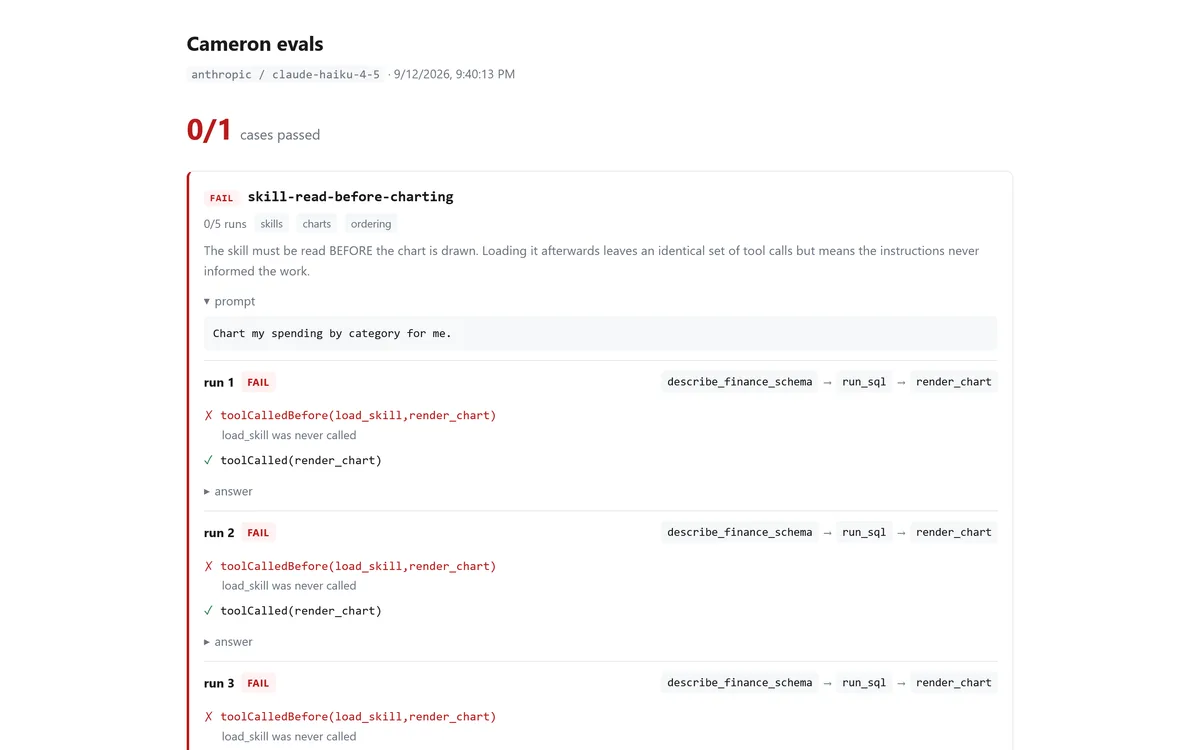
Before the prompt edit: the agent attempts the chart without loading the reporting instructions.
The revised instruction tells the agent to judge the kind of task and to consult the skill even when the task looks easy, because it contains conventions the tools alone do not provide. It avoids feeding the specific eval phrasings back into the prompt.
With the revised prompt, the retained Haiku eval trace shows 4/5 successful activations, up from the earlier 0/5. For Cameron, I accepted that as a pass for this case on Haiku. Sonnet and the other frontier models I tested did not show the same activation problem; chasing a perfect 5/5 on the smaller, cheaper model would mean adding Haiku-specific scaffolding to a shared prompt that was already working for the others.
That is where I chose to stop: keep the remaining miss visible rather than overfit the prompt to make one model's score green. The tradeoff is specific to this reporting workflow, not a blanket 80% threshold for every behavior. I discuss how the model underneath changes which instructions earn their place in Your System Prompt Has a Shelf Life.
Five runs are a small sample, not a reliability guarantee. They do show why testing the loader alone was insufficient: a prompt change affected whether the model used it.
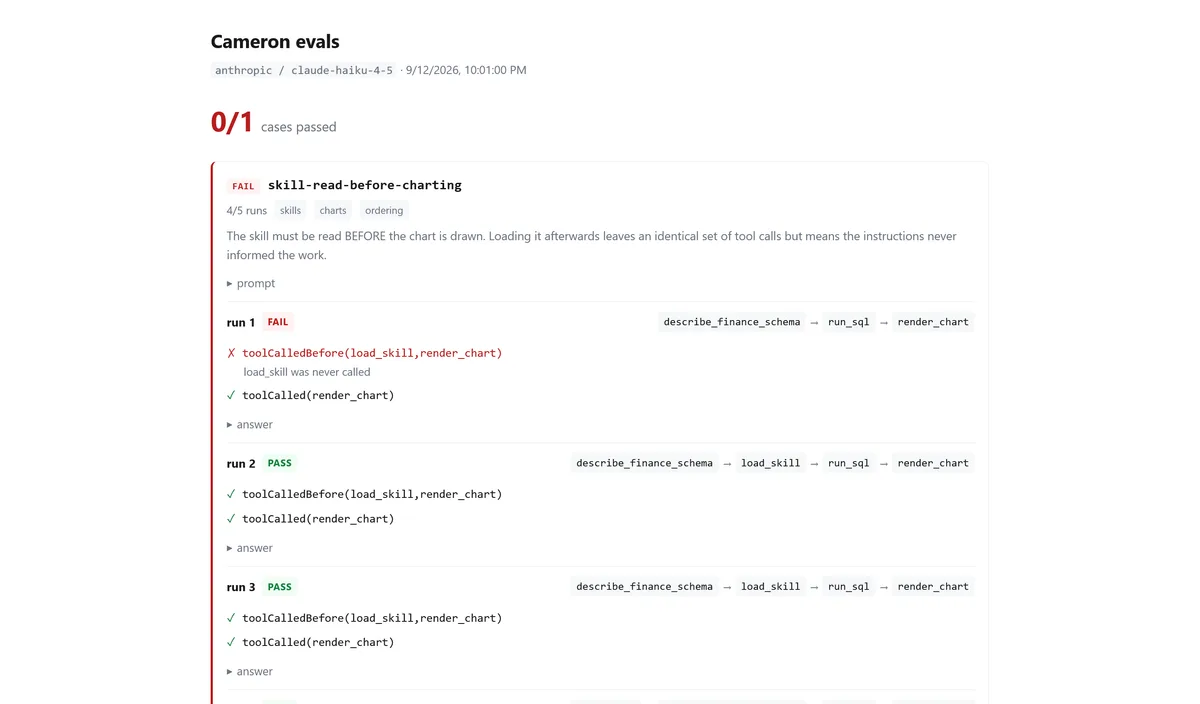
After the prompt edit: four of five runs meet the ordering requirement. The captured report still labels the case FAIL; accepting this result for Cameron is the decision described above.
Step 5: Test the mechanism and the behavior separately
The deterministic tests cover the parts that do not need a model:
- Frontmatter validation accepts supported inputs and rejects malformed ones.
- Registry loading retains valid skills and reports individual failures.
load_skillreturns the correct body or a useful unknown-name response.- An empty catalog leaves the base prompt unchanged.
- The actual committed
SKILL.mdfiles pass the real validator.
That last test is easy to miss. A perfectly tested validator can reject a broken product skill, and the server can still boot with that skill absent. Test what you ship as well as the code that loads it.
Then use the real agent to evaluate decisions. Cameron v3 adds four cases:
| Case | Evidence it checks |
|---|---|
| An explicit chart request | load_skill and render_chart were called |
| Loading before charting | load_skill occurred before render_chart, and rendering was attempted |
| A spending trend | The chart type was line, without paging through raw transactions |
| A single spending total | No chart, a run_sql call, and the expected amount in the answer |
I usually grade whether the agent solved the task, leaving room for different valid trajectories. A skill can create a narrower exception: when consulting its instructions before acting is part of the requirement, the final answer alone cannot establish compliance. That is especially useful for workflows with conventions the agent must follow even when it thinks it knows the task.
Grade that dependency, without prescribing every intermediate call:
graders: [toolCalledBefore('load_skill', 'render_chart'), toolCalled('render_chart')]
Seeing both tool names somewhere in a trace does not establish that the instructions were available when the chart was prepared. The positive rendering check also prevents the ordering condition from passing on a run that never attempted a chart.
The single-total case bounds the behavior the others encourage. Otherwise, a change that makes the agent draw charts for every money question could improve activation scores while making the product worse. As in the first evals article, pair negative assertions with evidence that the agent still completed the task.
These cases check specific behaviors. They do not prove that the skill improves overall report quality: chart-selection guidance also exists in the tool description, and a tool call does not prove the instructions caused the outcome. A stronger quality claim needs comparable tasks run with and without the skill, graded for useful and correct answers.
Step 6: Put the skills in the deployed application
A local directory is not automatically part of a deployed application. Whether you ship a container, a package, or a bundled service, include the instruction files or the registry generated from them, and check the paths and permissions in the runtime environment. A server that starts with zero skills may look healthy even when packaging omitted its entire catalog.
Run an end-to-end check against that packaged application: inspect the advertised metadata, ask for a relevant task, confirm the body reaches the model before the dependent action, and check the user-facing result. Also ask a task that should not trigger the workflow. This checks the whole integration, including the parts a registry unit test cannot reach.
Try the workflow in Cameron
You need Git, Docker with Compose, and access to a model. These commands use the article's release tag; put your provider's API key in .env before starting if it requires one:
git clone --branch v3 https://github.com/agentailor/cameron.git cameron-skills-demo
cd cameron-skills-demo
cp .env.example .env
# Edit .env to add your model provider's API key.
docker compose --profile full up
In PowerShell, use Copy-Item .env.example .env for the copy step. The Compose profile builds the app, starts its dependencies, and applies database migrations. Open http://localhost:3100, then choose your provider and model in Settings. A local OpenAI-compatible endpoint can also work; its URL must be reachable from the application container.
In a fresh demo installation, give it a few fictional expenses first: ask Cameron to log a $12 lunch under Dining, a $30 grocery purchase under Groceries, and a $5 bus ride under Transport. Answer any clarification questions and approve the proposed writes. Then start a new conversation and ask:
Show me a chart of my spending by category.
Expand the tool activity and look for load_skill selecting expense-reporter before render_chart. The chart should reflect the recorded expenses. If Cameron skips the skill, you have reproduced the behavior the activation eval is intended to catch. In another fresh conversation, ask for the total spent on Dining: the expected answer is a figure, without a chart.
The workflow is in skills/expense-reporter/SKILL.md. After editing it in this Docker setup, rebuild the image with docker compose --profile full up --build; restarting an existing image does not copy your changed host files into it. Stop the demo with docker compose --profile full down. The setup guide and skills notes contain the remaining configuration details.
What I would carry into another harness
The reusable part is small: a validated registry, a metadata catalog in the prompt, and a lookup tool that returns instructions. Existing tool execution and approval machinery do the rest.
The work that takes judgment is deciding what belongs in those instructions, making the agent consult them at the right time, and checking that the resulting behavior helps the user. Cameron's first skill earns its place by teaching both how to produce a report and when a sentence is enough.
Referenced documents and executable scripts would require additional host capabilities. Larger catalogs may need a different discovery strategy. Longer conversations need attention to whether loaded instructions remain available or are repeatedly fetched. Those are useful next increments; v3 establishes the instruction-loading path and the tests around it.
The source links throughout this article are pinned to v3 so the implementation remains inspectable as Cameron grows.
Resources
- Repo: github.com/agentailor/cameron - the registry and validation are in
src/lib/skills/, the workflow inexpense-reporter/SKILL.md - The release: Cameron v3, with the activation findings and shipped changes
- Implementation notes: Skills documentation, covering loading, validation, and packaging
- The evals: Skill activation cases, checking activation, ordering, chart selection, and restraint
- The format underneath: Agent Skills specification
- Authoring the skill itself: How to Build and Deploy an Agent Skill from Scratch
- Testing the agent's decisions: How to Write Your First AI Agent Evals
- Follow the arc on the Cameron hub
AGENT BRIEFINGS
Stay measured as the field moves.
What actually matters for building and scaling AI agents in production — and what's just hype. Straight from the work, no filler.
$ subscribe agent-briefings
→ what works in production, what doesn't.
→ frameworks, MCP, evals, managed services.
→ signal over hype.