

· 10 min read
Engineering Context for Local and Cloud AI: Personas, Content Intelligence, and Zero-Prompt UX
How DocuMentor AI delivers personalized results without asking users what they want. A deep dive into persona-driven design, strategic content decomposition, and zero-prompt UX for hybrid AI systems.

Agents are easier to build with a spec. Work yours out with Agentailor, then hand it to your agent.
Get a handoff briefIn the previous article, we covered how DocuMentor AI's hybrid architecture seamlessly adapts between Chrome's local Gemini Nano and cloud AI. We built a system that automatically routes tasks based on capabilities and performance constraints.
But having a robust execution layer is only half the battle. The other half? Engineering the context that goes into those models.
This is where most AI tools fall short. They give you a powerful model and a blank text box, then expect you to figure out what to ask. It's like handing someone a professional camera and saying "take a good photo"—technically possible, but the burden is entirely on the user.
DocuMentor takes a different approach: zero-prompt UX through intelligent context engineering. Users never write prompts. They click a feature (Quick Scan, Deep Analysis, Cheat Sheet), and the extension handles the rest—assembling the right persona elements, extracting the right page sections, and shaping everything into a request the AI can't misinterpret.
This article breaks down how that works: the philosophy behind zero-prompt design, the persona system that personalizes every response, and the content intelligence layer that knows exactly what to send to the AI.
The Zero-Prompt Philosophy
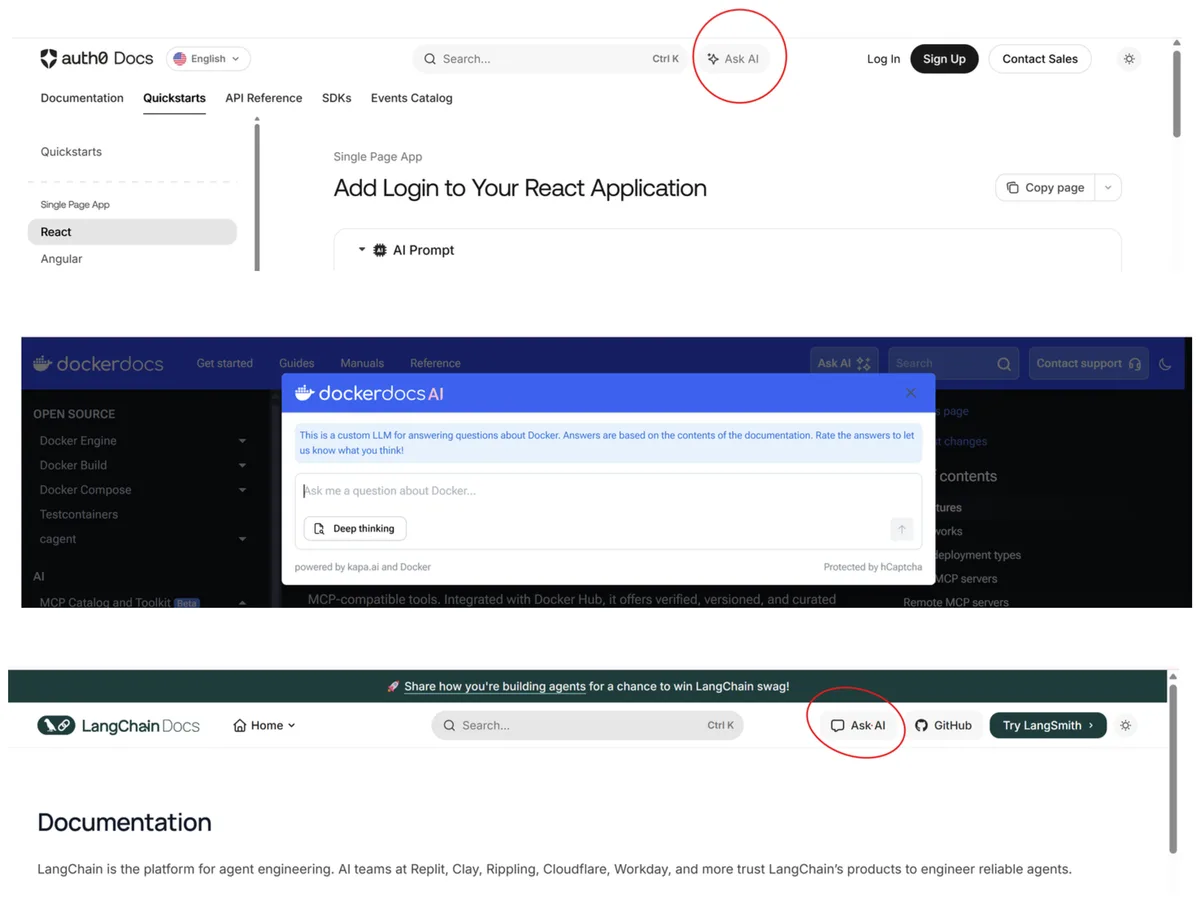
This seems user-friendly on the surface, but if you don't know what you want to ask, it creates three problems:
- Cognitive load - Users have to think about how to phrase their question
- Intent ambiguity - Small wording changes lead to wildly different answers
- Generic responses - Without context about the user, AI gives one-size-fits-all answers
I built DocuMentor to solve my own problem: I spend hours every week scanning documentation, blog posts, and API references trying to extract what I need quickly. Sometimes I want a TL;DR to decide if it's worth reading. Other times I need a cheat sheet for future reference. And sometimes I just want to know "should I care about this?"
These are specific, recurring needs. Why should I have to articulate them from scratch every time?
The solution: feature-first design. Instead of a blank chat box, DocuMentor exposes four purpose-built features:
- Quick Scan - Instant insights: TL;DR, "should I read this?", related resources, page architecture
- Deep Analysis - The deep dive: comprehensive overview, code patterns, video recommendations, learning resources with reasoning
- Cheat Sheet - Future reference: condensed, actionable summary optimized for quick lookup
- AskMe - Targeted chat: select text or images and ask specific questions
Each feature represents a pre-crafted intent. Users don't have to think about how to ask, they just pick the outcome they want. The extension takes care of the rest: crafting the prompt, selecting the right page sections, and applying the user's persona.
This isn't just about convenience. It's about eliminating ambiguity. When a user clicks "Quick Scan," there's zero room for misinterpretation. The AI knows exactly what format to return, what level of detail to provide, and what the user cares about.
Persona-Driven Personalization
After building the initial feature set, I realized something critical: none of these features should return generic answers.
A "Should I read this?" recommendation means nothing without knowing who's asking. A senior AI engineer doesn't need to read an intro to neural networks. A junior frontend developer does need to read advanced React hooks patterns. Same feature, same page, completely different answers.
That's when I introduced the persona system—a user profile that shapes every AI response:
What's in a persona:
- Role - AI/ML Engineer, Frontend Developer, Backend Engineer, etc.
- Seniority - Beginner, Intermediate, Senior
- Skills - Programming languages, frameworks, concepts each with a proficiency level (Beginner, Intermediate, Advanced)
- Learning Goals - What the user wants to master right now (e.g., "Master LangGraph for production AI agents")
- Learning Preferences - Text, video, or mixed
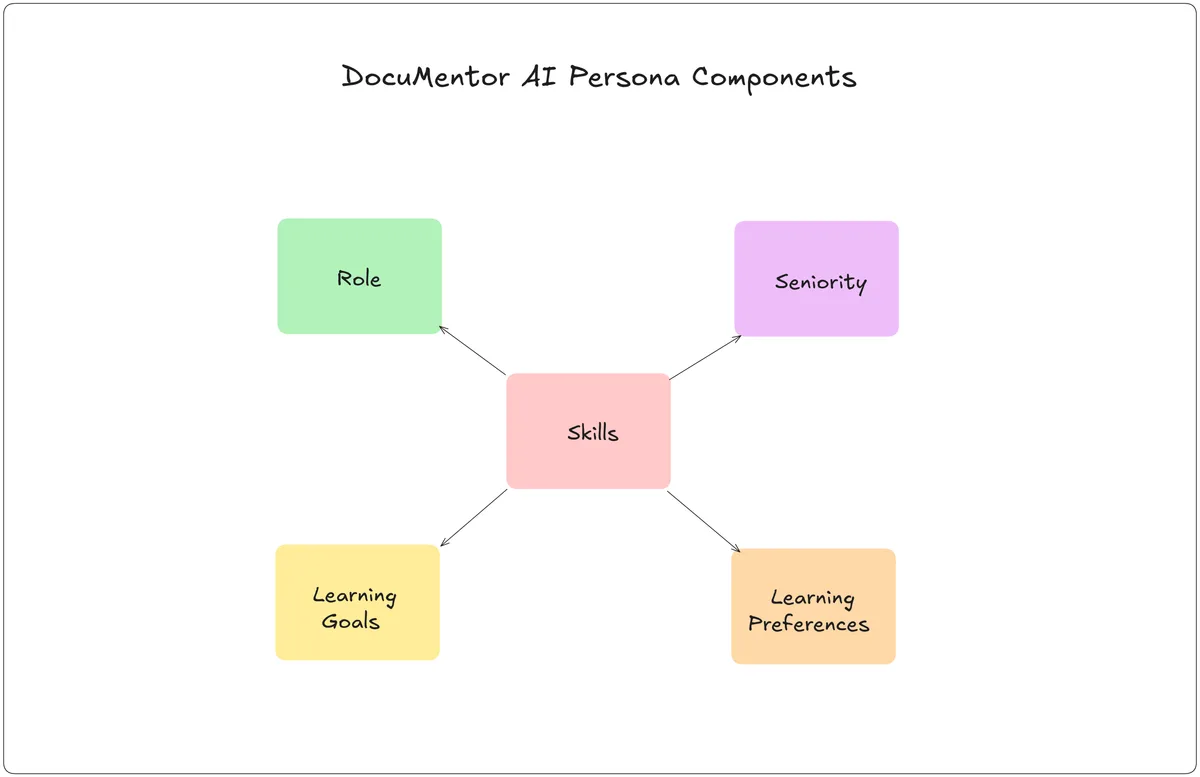 Figure: The five components of a DocuMentor persona.
The challenge wasn't just collecting this information—it was knowing which elements matter for which features.
For example:
- Learning preferences are irrelevant for cheat sheets (the user already decided they want text)
- Skills and goals are critical for "Should I read this?" recommendations
- Seniority affects explanation depth across all features
- Role determines which code patterns to highlight in Deep Analysis
This creates a mapping problem: each feature needs a subset of the persona, not the whole thing. Sending irrelevant persona data just adds noise and wastes tokens (especially on local AI with tight context limits).
Here's where it gets interesting. Let's say you're a Junior Frontend Developer learning React, and you land on an article about advanced state management patterns. DocuMentor's "Should I read this?" feature might say:
Yes, read this. This covers useReducer and Context API patterns that will level up your React skills. It assumes familiarity with useState, which you have. The examples are practical and match your learning goal: mastering React for production apps.
Now imagine a Senior Backend Engineer who knows React but isn't focused on frontend work hits the same page:
Skip this. You already understand these patterns from your React experience. This won't advance your current goal (mastering distributed systems). If you need a refresher later, the cheat sheet feature has you covered.
Same page. Same feature. Completely different recommendations, because the persona told the AI who's asking and why they care.
This isn't just personalization for its own sake. It's about respecting the user's time. Generic AI tools waste your time by making you read irrelevant content or miss important insights. Persona-driven AI acts like a knowledgeable colleague who knows your background and priorities.
Content Intelligence: Strategic Page Decomposition
Early on, I made the naive mistake most AI developers make: I fed the entire page HTML to the model, assuming it could "figure it out."
This failed spectacularly:
- Context overflow - Raw HTML easily exceeds Chrome AI's ~4K token limit
- Noise drowning signal - Ads, navigation, footers, and JavaScript compete with actual content
- Hallucinations - Small models like Gemini Nano get confused by irrelevant information
The first fix was obvious: content extraction. I used Mozilla's Readability library (with a custom fallback for pages where Readability fails) to extract clean, readable text from the page.
But that still wasn't enough. Even clean content presented a new problem: not every feature needs the same information.
For example:
- Summaries and cheat sheets need the full article content
- Video recommendations only need a summary of the page (not 10K words of content)
- "Learn Resources" suggestions need page links and navigation context, not the article body
Sending everything to every feature wastes tokens, increases latency, and reduces relevance. The solution: strategic page decomposition.
DocuMentor breaks every page into purpose-driven sections:
- Main content - The core article text (extracted via Readability)
- Table of contents - Page structure and hierarchy
- Page links - URLs embedded in the content
- Code blocks - Extracted separately for pattern analysis
- Breadcrumbs & navigation - Contextual metadata about where this page fits in the documentation
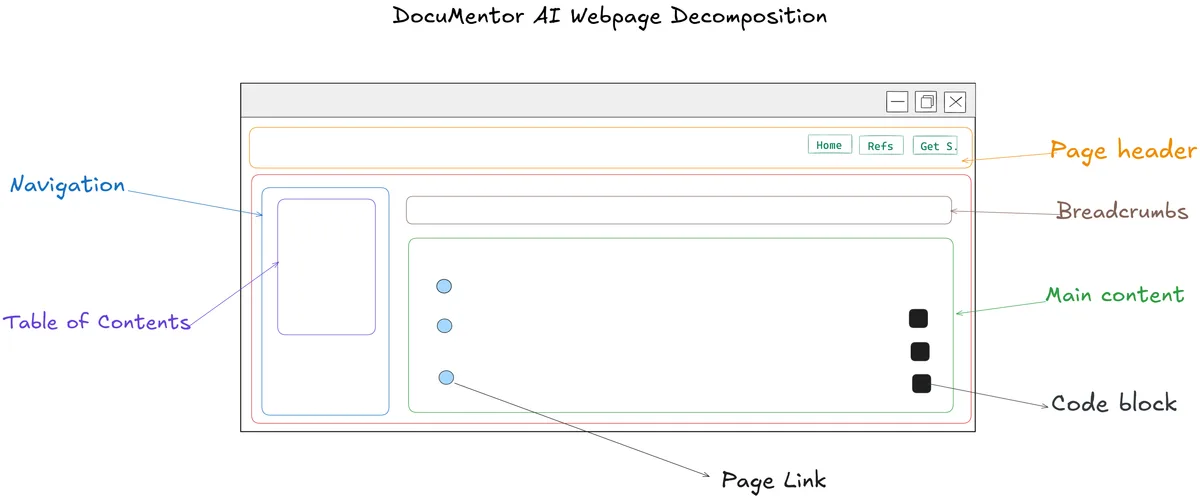
Each feature gets exactly what it needs:
| Feature | Content Sections Used |
|---|---|
| Summary | Main content |
| Cheat Sheet | Main content + code blocks + page links |
| Video Recommendations | Summary only (not full content) |
| Learn Resources | Summary + page links + breadcrumbs + navigation |
| Code Patterns (Deep Analysis) | Code blocks + surrounding context |
Figure: Page sections are strategically routed to different features based on what information is actually relevant.
Let's look at a concrete example: video recommendations.
The naive approach would send the full article content and ask the AI to find relevant YouTube videos. For a 10K-word documentation page, this would:
- Burn through most of Chrome AI's token budget on a single feature
- Slow down the response (the model has to process 10K words before even calling the YouTube API)
- Risk quota errors on devices with lower VRAM
Instead, DocuMentor:
- Generates a summary of the page (200-300 words)
- Sends the summary + user persona to the AI
- AI generates an optimal YouTube search query based on the topic and user's learning goals
- Calls the YouTube Data API (handled by the extension, not the AI)
- AI ranks the top 10 results based on relevance to the user's goals and the page summary
- Returns the top 3 videos with compelling, personalized descriptions
This approach is 10x faster and uses 1/10th the tokens compared to sending full content. And because the AI only sees relevant information (summary + persona), the recommendations are more accurate.
This pattern repeats across every feature: content intelligence isn't about giving the AI more information—it's about giving it the right information.
Adaptive Prompting Across Providers
One final layer of context engineering: how you shape the request matters as much as what you send.
As covered in the previous article, DocuMentor runs on two AI providers: Chrome's local Gemini Nano and a cloud backend (Gemini 2.0 Flash). They have radically different capabilities.
For the same feature, the prompts are adapted:
Gemini Nano (local):
- Simple, directive instructions
- One reasoning task per prompt
- Defensive output parsing (it sometimes returns malformed JSON)
Cloud models:
- Richer, multi-step instructions
- Tool-calling support
- Reliable structured output
The persona and content sections stay the same, but the way they're framed changes based on the model's reasoning capacity.
For example, video recommendations on local AI use sequential decomposition (covered in the previous article): generate search query → call API → rank results → format output. Each step is a separate AI call.
On cloud AI, the same feature runs as a single tool-augmented call: the model generates the query, calls the YouTube tool, ranks results, and formats the output—all in one request.
Users never see this complexity. They click "Video Recommendations," and the system automatically routes to the appropriate provider and prompt strategy.
What's Next
This is just the first version of DocuMentor's context engineering system. Two areas I'm exploring for future iterations:
1. User-customizable feature prompts
Let users add personalized instructions to individual features. For example:
- "In summaries, always include a brief definition of core concepts"
- "For video recommendations, prioritize short tutorials under 15 minutes"
- "When suggesting resources, focus on official documentation over blog posts"
This would let users fine-tune the experience without overthinking every request.
2. Dynamic personas
Right now, personas are static. But a fullstack developer might want to view a page as a frontend engineer one day and a backend engineer the next, depending on context.
Future versions could let users switch personas per page or even infer persona adjustments based on the content type (e.g., automatically apply a "security-focused" lens when reading about authentication).
The goal remains the same: personalization without overthinking. AI should adapt to you, not the other way around.
Conclusion
Building effective AI features isn't just about picking the right model or writing clever prompts. It's about engineering the context that goes into those prompts: knowing your user (persona), knowing what information matters (content intelligence), and eliminating ambiguity (zero-prompt UX).
DocuMentor's context engineering system rests on three pillars:
- Zero-prompt UX - Features replace chat boxes, eliminating user guesswork
- Persona-driven personalization - Every response adapts to role, skills, goals, and preferences
- Content intelligence - Strategic decomposition ensures features get exactly what they need
The result: an AI tool that feels less like a chatbot and more like a knowledgeable colleague who understands what you're trying to accomplish.
If you want to see this in action, try DocuMentor AI on a technical article or documentation page. And if you find it useful, the best way to support this work is to leave a review and share it with someone who might benefit.
I'd also love to hear from you: What other aspects of building DocuMentor would you like to hear about? Drop a comment or reach out—your feedback shapes what I write next.
Related Articles
AGENT BRIEFINGS
Stay measured as the field moves.
What actually matters for building and scaling AI agents in production — and what's just hype. Straight from the work, no filler.
$ subscribe agent-briefings
→ what works in production, what doesn't.
→ frameworks, MCP, evals, managed services.
→ signal over hype.