

· 9 min read
How I Made My Blog Native to AI Agents (And Launched One)
The web was built for browsers. I spent the last few months making Agentailor native to AI agents too — here is what I built, why I built it, and what you can steal for your own project.

Agents are easier to build with a spec. Work yours out with Agentailor, then hand it to your agent.
Get a handoff briefA few months ago I started noticing something in my analytics. Agentailor is about a year old now, ~40K reads total, averaging around 3.5K reads per month. But inside that traffic, a growing slice wasn't coming from humans. It was agents — coding assistants, AI crawlers, automated pipelines — fetching articles to use as context.
This wasn't a surprise exactly. The blog covers MCP, LangGraph, and production AI agent patterns. Of course tools like Claude Code, Cursor, and ChatGPT are going to pull this content when developers ask them agent-related questions. But watching the trend grow month after month made something click: if agents are already here, I should build for them properly.
That's when I started thinking seriously about what "AI-first" means in practice — not as a design philosophy but as a set of concrete engineering choices. Here's what I ended up building, why each decision was made, and what you can apply to your own project.
What AI-First Actually Means
Before diving into the features, let me be precise about what I mean.
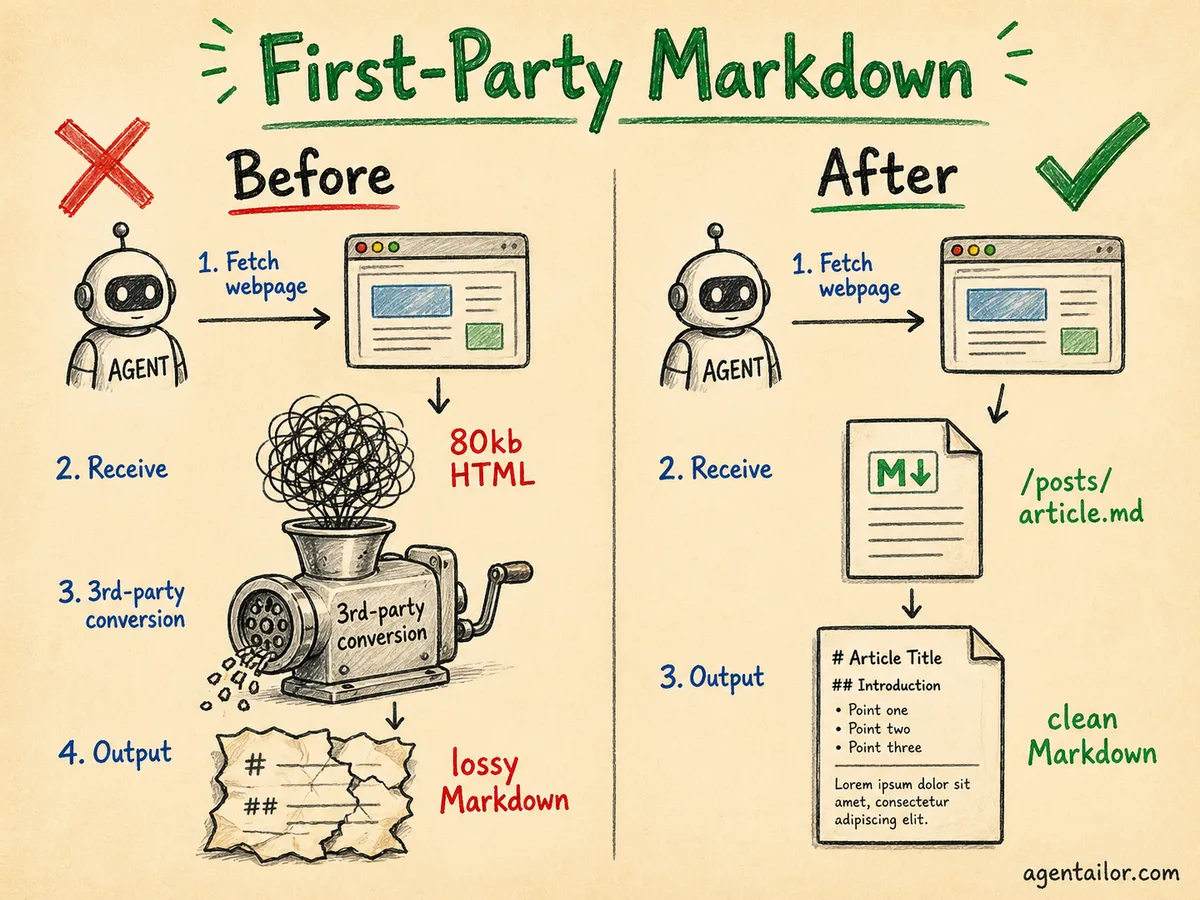
AI agents are already users of your platform. Most content platforms haven't designed for them. The instinct is to say "agents can just convert HTML to Markdown" — and technically, many MCP tools do exactly that. But third-party conversion is lossy. You have no control over what gets dropped (code blocks, tables, structured callouts), it adds latency to every request, and the output quality varies based on which tool is doing the converting.
First-party Markdown means you control the output. You decide what structure is preserved, how code blocks are formatted, whether image URLs are absolute. The agent gets exactly what you intended to deliver.
But this isn't only about agents. It's about giving users — human and AI alike — the choice of how to consume your content. Not everyone wants to read a 4,000-word article end-to-end. Some want to paste it into their AI assistant and ask a specific question. Some want to skim. Giving them clean, accessible formats respects that.
llms.txt and llms-full.txt
The first thing I added was llms.txt.
The idea is simple: robots.txt tells crawlers what they can access, llms.txt tells AI assistants what they should read. It's an emerging standard (llmstxt.org) and the concept is straightforward — a plain text file at the root of your site that lists your content with links and optional summaries.
Here's what Agentailor's llms.txt looks like:
# Agentailor

> Your go-to resource for building production-ready AI agents...

Note: All article links point to .md files containing clean Markdown. Use these
instead of the HTML pages to save tokens.

## Blog Posts

- [How to Build Your First MCP Server in 5 Minutes](https://blog.agentailor.com/posts/create-your-first-mcp-server-in-5-minutes.md): Step-by-step guide...
- [LangGraph vs LlamaIndex for JavaScript](https://blog.agentailor.com/posts/langgraph-vs-llamaindex-javascript.md): Comparing the two...
Note that the links point to .md files, not HTML pages. This is intentional: when an AI assistant follows a link from llms.txt, it gets clean Markdown, not a web page. The file is telling agents: "here's what exists, and here's how to read it efficiently."
I also generate llms-full.txt: the same index but with more detailed summaries of every post included inline. This is useful for AI tools that want to load the entire site's content into a single context window.
Both files are generated at build time from the published blog posts. Every build keeps them in sync automatically.
# title, a > site description, and a list of links. You could generate it with a build script, a route handler, or even a static file you update manually. The spec is open and lightweight. 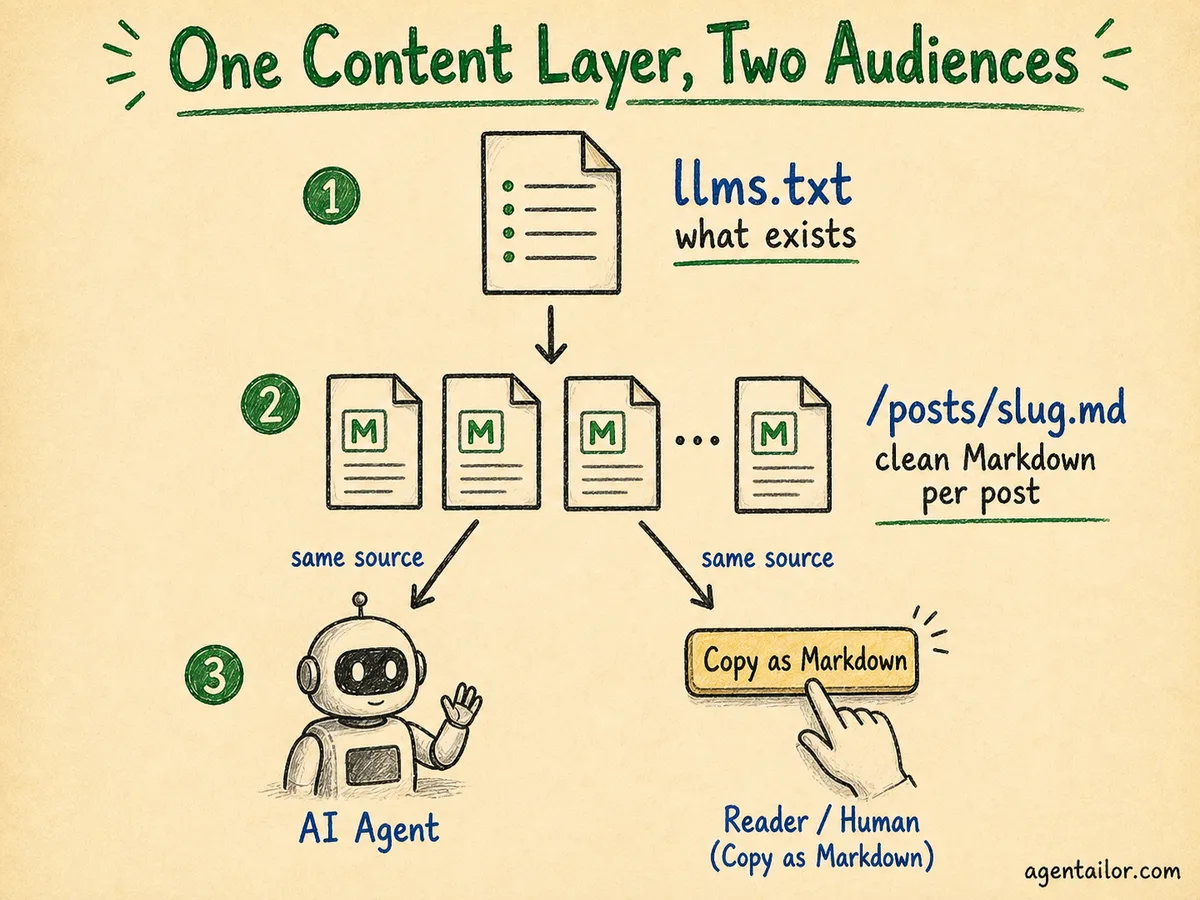
Per-Post Markdown API
Every post on Agentailor is available at /posts/[slug].md.
Fetch https://blog.agentailor.com/posts/mcp-typescript-sdk-complete-guide.md and you get 45,000 words of clean, structured Markdown. No nav. No footer. No scripts. No conversion artifacts. The code blocks are intact, the headings are preserved, the image paths are absolute URLs.
This is the backbone that llms.txt links to. But it's also available to anything that knows the URL pattern — MCP fetch tools, RAG pipelines, AI coding assistants.
The implementation is straightforward: during the build, a script generates a .md file for each published post and writes it to the static output folder. The files are served as static assets — no route handler needed.
The "Copy as Markdown" button is the human-facing equivalent of the same feature. On every post, there's a small button in the header. Click it and the article's Markdown is copied to your clipboard — ready to paste directly into Claude, ChatGPT, or any AI assistant. The implementation fetches /posts/[slug].md on demand and writes it to the clipboard:
const handleCopy = async () => {
  const mdUrl = window.location.pathname + '.md'
  const res = await fetch(mdUrl)
  const text = await res.text()
  await navigator.clipboard.writeText(text)
}
That's the whole thing. The URL pattern pathname + '.md' maps /blog/some-post to /posts/some-post.md. No API call, no server-side logic, just a static file fetch.
The /summarize <url> command in the Agentailor agent (more on that below) is the agent-native equivalent of this button. Both are solving the same problem — give users and agents the content in the format they actually need — from different entry points.
The Blog Redesign
I also redesigned the blog earlier this year.
The old design was functional but cluttered. The new one takes inspiration from a minimalistic approach: high contrast, generous whitespace, typography-first, minimal chrome. The goal is that nothing competes with the article itself.
This matters more than it sounds for AI-first design. Clean, semantic HTML is easier for agents to parse even before they hit the Markdown API. Clear heading hierarchy, consistent code block structure, and minimal decorative markup all make the HTML more parseable. It's a floor, not a ceiling — the Markdown API is still the right choice for agents — but it doesn't hurt to start from a well-structured baseline.
More importantly, the redesign was about making the blog a place worth returning to. 3.5K reads a month means people are finding Agentailor useful. The redesign is about earning that return visit.
The Agentailor Agent: v0.1
This is the piece I'm most excited about, and the most intentionally scoped.
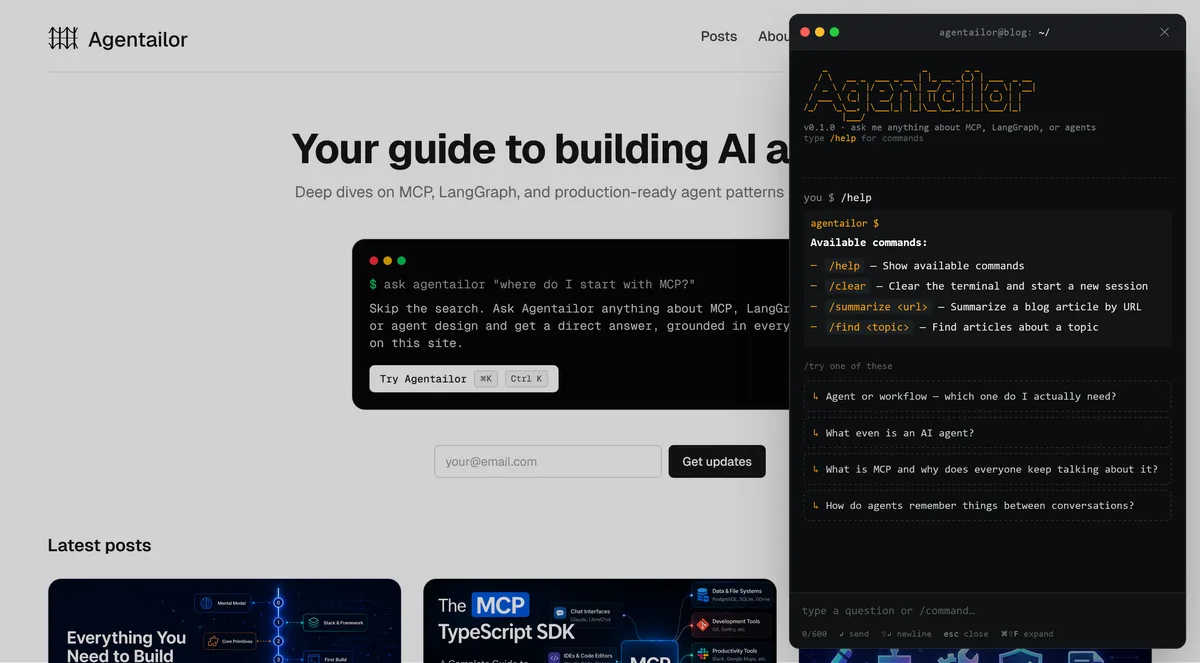
The Agentailor agent is a chat widget — designed as a terminal — embedded on the site. It's live now at blog.agentailor.com. The terminal aesthetic isn't decoration. The audience is developers. Terminals are how we think. Slash commands map to developer instincts in a way that clicking buttons doesn't.
Here's what it supports in v0.1:
| Command | What it does |
|---|---|
/help | Show available commands |
/clear | Clear the terminal, start a new session |
/summarize <url> | Summarize a blog article by URL |
/find <topic> | Find articles about a topic |
| Natural language | Consult on architecture, production patterns, and agent design |
Why This Is Different from a Chat Widget
Most chat widgets on content sites are support tools — they answer questions, resolve ambiguity, point to docs. This one is designed to do something harder: act as an architect.
The difference matters. Any agent with web search or the right skills can answer a question. What's rarer is an agent that tells you why your current approach won't scale, what the production failure mode looks like, or how the pattern you're using breaks under real-world load. That's the gap Agentailor is designed to fill — not information retrieval, but architectural judgment built on direct experience building and writing about these systems.
Think of it less as "ask a question, get an answer" and more like consulting a senior engineer: "here's what I'm building, here's my current approach — is this right? What would you do differently at scale?"
The design is explicitly dual-audience: built for human developers today, built for agents too. What does "built for agents" mean here? It means the interface is designed to be callable, not just clickable. The slash command vocabulary maps to agent-native patterns (consult, find, summarize) not GUI patterns (click, scroll, navigate). The responses are structured to be useful as context passed between agents, not just readable as chat.
The roadmap for v0.2 and beyond is: more commands, broader knowledge base, and an agent-to-agent interface. The vision is an agent that other coding agents can consult the way a junior dev consults a senior engineer. Your agent hits a hard architectural decision — "should I use a supervisor pattern or parallel subgraphs here?" — and rather than guessing or surfacing generic results from a web search, it consults Agentailor: a platform with a proven track record, built specifically for this problem space. It gets back a specific, opinionated answer grounded in real production experience — not a generic result scraped from the internet.
That's what "AI-first platform" means at its fullest: not just readable by AI, but genuinely useful to AI as a peer.
What You Can Take From This
If you're building a content platform, a developer tool, or any product that AI agents might interact with, here are five concrete things you can steal:
1. Add llms.txt. Takes less than an hour. List your content, point links to clean Markdown versions. The spec is at llmstxt.org. It signals to AI tools that you've thought about their needs.
2. Serve your content as first-party Markdown. Whether it's /posts/[slug].md, a /api/content endpoint, or a bulk export, give agents a format they can use without lossy conversion. You control the fidelity.
3. Add a "Copy as Markdown" button. Your human readers who use AI assistants will thank you. One button, one fetch call to your own .md endpoint. Fifteen minutes of work.
4. Design for choice, not just completeness. Not everyone reads every word. Give users tools to engage with your content in the way that works for them — summaries, search, quick copy. This applies to both human and AI users.
5. Ask whether your interface serves agents. If you're building a chat interface or an API, ask explicitly: can an AI agent use this? Not just a human with an AI assistant — but an agent acting autonomously. If the answer is no, it probably could be yes with small changes.
What's Next
The Agentailor agent is v0.1 and I'm shipping this intentionally. The next version will expand the knowledge base, add more commands, and open up the agent-to-agent interface.
If you want to see it in action: open blog.agentailor.com, click the terminal in the bottom right, and bring it a real problem — an architectural decision you're stuck on, a pattern you're not sure scales, a tradeoff you want a second opinion on. That's what it's built for.
For context on where agents are heading more broadly, the Agent Development Roadmap is a good next read. If you want to go deeper on MCP specifically, the MCP TypeScript SDK Complete Guide covers the protocol end-to-end.
The web was built for browsers. It's being rebuilt for agents. Might as well build for both.
AGENT BRIEFINGS
Stay measured as the field moves.
What actually matters for building and scaling AI agents in production — and what's just hype. Straight from the work, no filler.
$ subscribe agent-briefings
→ what works in production, what doesn't.
→ frameworks, MCP, evals, managed services.
→ signal over hype.