

· 12 min read
You Don't Need to Build Your AI Agent — Just Use Goose
Most agent content teaches you to build. Goose is a battle-tested open-source AI agent you can install and run today, with 70+ extensions and the full codebase if you ever need to go deeper.

Agents are easier to build with a spec. Talk yours through in a few questions, then hand the brief to your coding agent.
Plan it with AgentailorYou Don't Always Need to Build
Every week there's a new agent framework to learn, a new tutorial showing you how to wire up LLMs, tools, and memory from scratch. At some point the question shifts: do I actually need to build this, or does something good enough already exist?
For a large class of problems, something good enough already exists. You don't need to write agent code. You need a capable agent that already exists, that you can configure and extend without starting from scratch.
Goose is that agent. It's open source, runs natively on your machine, supports 15+ LLM providers, and ships with 70+ extensions. It was built by Block (the company behind Square and Cash App), and in early 2025 it was transferred to the Agentic AI Foundation under the Linux Foundation, the same governance model as Linux itself. With 44k+ GitHub stars and more than 500 contributors, it's not an experiment.
The goal of this article is simple: show you what Goose can do, get you running in five minutes, and explain when it makes sense to build on top of it rather than use it out of the box.
What you'll learn:
- What Goose is and how it compares to other open-source agents
- How to install and run your first session in under 5 minutes
- Core concepts: extensions, skills, subagents, and multi-LLM support
- How Recipes and the Scheduler turn one-off sessions into automated workflows
- When to use Goose out of the box and when to build on top of it
What Is Goose?
Goose is a local-first, general-purpose AI agent. It's not an IDE plugin and not a SaaS product. You run it on your machine as a desktop app, a CLI, or via API, and it executes multi-step tasks on your behalf: writing and running code, managing files, calling APIs, browsing the web, and more.
The part that makes Goose interesting for developers is what it's built on:
- MCP (Model Context Protocol) for extensions — the same open standard you use to build MCP servers
- ACP (Agent Client Protocol) for multi-agent orchestration
- 15+ LLM providers — Anthropic, OpenAI, Google, Ollama, OpenRouter, Azure, Bedrock, and more. No vendor lock-in. Use your existing API keys or subscriptions.
This is different from most agent tools, which are built around a single provider's API and make it painful to switch. Goose is explicitly designed to be provider-agnostic, and its governance is community-driven, not corporate.
Goose vs OpenClaw
OpenClaw sits at 374k+ GitHub stars and is probably the most visible open-source agent right now, but the two projects aren't really competing. OpenClaw is a multi-channel chat gateway focused on routing conversations across platforms like WhatsApp, Slack, and Discord. Goose is a task execution agent built for automation and local workflows. The other difference worth knowing: OpenClaw is community-maintained, while Goose is governed by the Agentic AI Foundation under the Linux Foundation — a meaningful distinction if long-term stability matters to you.
Quick Start: Up and Running in 5 Minutes
Goose has two interfaces: a desktop GUI and a CLI. This guide focuses on the desktop app, which is the best way to explore what Goose can do. The CLI is worth knowing about for a different use case: running recipes on remote servers, integrating into CI/CD pipelines, or scripting agent workflows in headless environments. For day-to-day use on your machine, the desktop app is where you want to be.
Prerequisites
- An API key for at least one supported provider (Anthropic, OpenAI, Google, etc.)
- macOS, Linux, or Windows
Installation
Download the desktop installer for your platform from the Goose installation page. On macOS, you can also use Homebrew:
brew install --cask block-goose
Configure Your LLM Provider
On first launch, Goose asks you to pick a provider and enter your API key. Select your preferred provider, paste in the key, and you're done. No config files to edit.
Start a Session
Click the home button to start a new session. Goose opens a workspace in your current directory with full access to the filesystem, shell, and any extensions you've enabled.
Your First Task
Describe what you want in plain language:
Read my blog data (csv files) in /data folder, analyze and create
an interactive web dashboard to visualize the data.
Goose will read the files, analyze the structure, write the dashboard code, and serve it — fixing any issues it hits along the way, without you intervening.
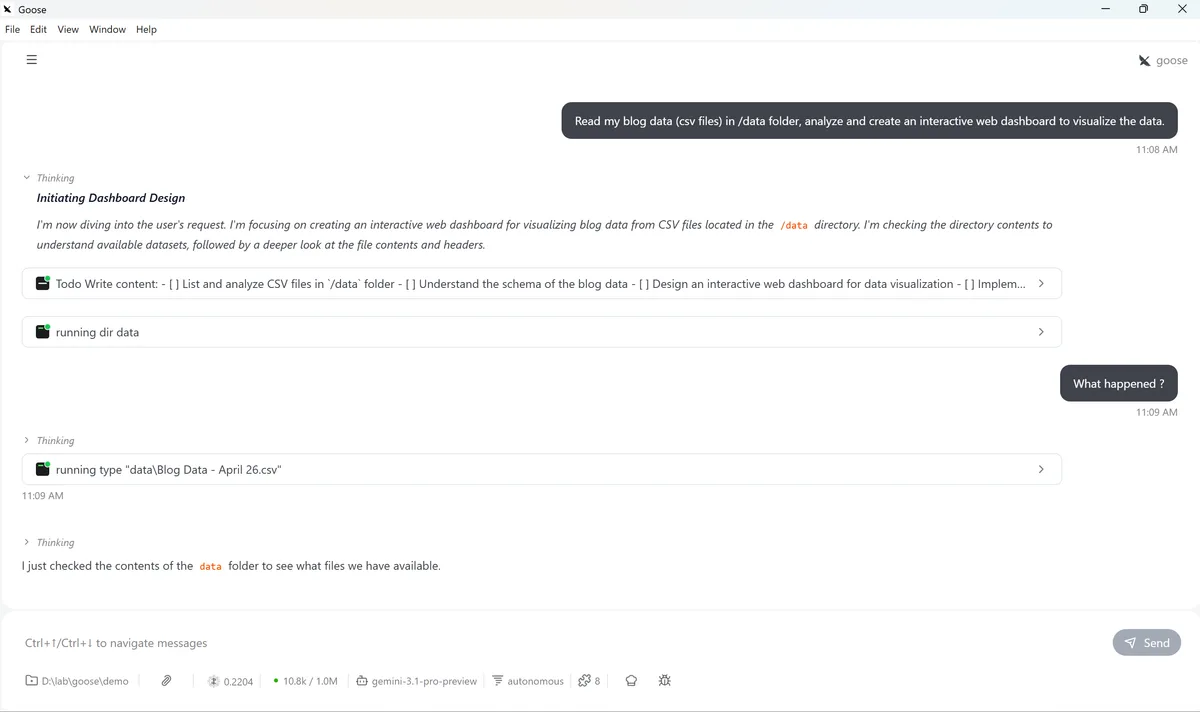
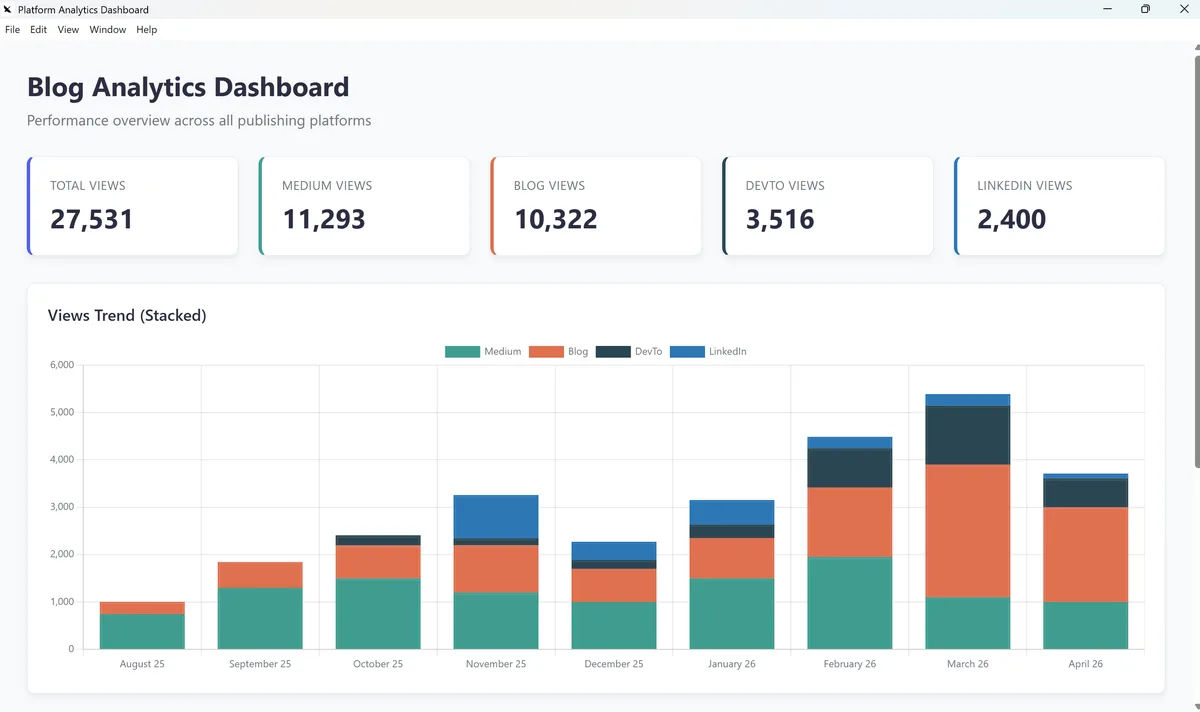
The resulting dashboard, generated end-to-end by Goose from a single natural language prompt.
That's the core experience. The session model is conversational: you describe tasks, Goose executes them, and you can refine or redirect at any point.
AGENT BRIEFINGS
Get the next one in your inbox.
Practical AI agent engineering — what works in production, and what's just hype.
Core Concepts
MCP Extensions
Because Goose is built on MCP, every MCP extension that works with Claude Desktop or any other MCP client also works with Goose. The extensions marketplace lists 70+ officially supported integrations across development tools (GitHub, Docker, git), data stores (PostgreSQL, MongoDB, SQLite), productivity apps (Google Drive, Slack, Notion), and browser automation. Any MCP server you've built yourself plugs in the same way.
Extensions run as independent processes, so enabling one doesn't affect session stability. Adding a new capability is a few clicks in the desktop UI.
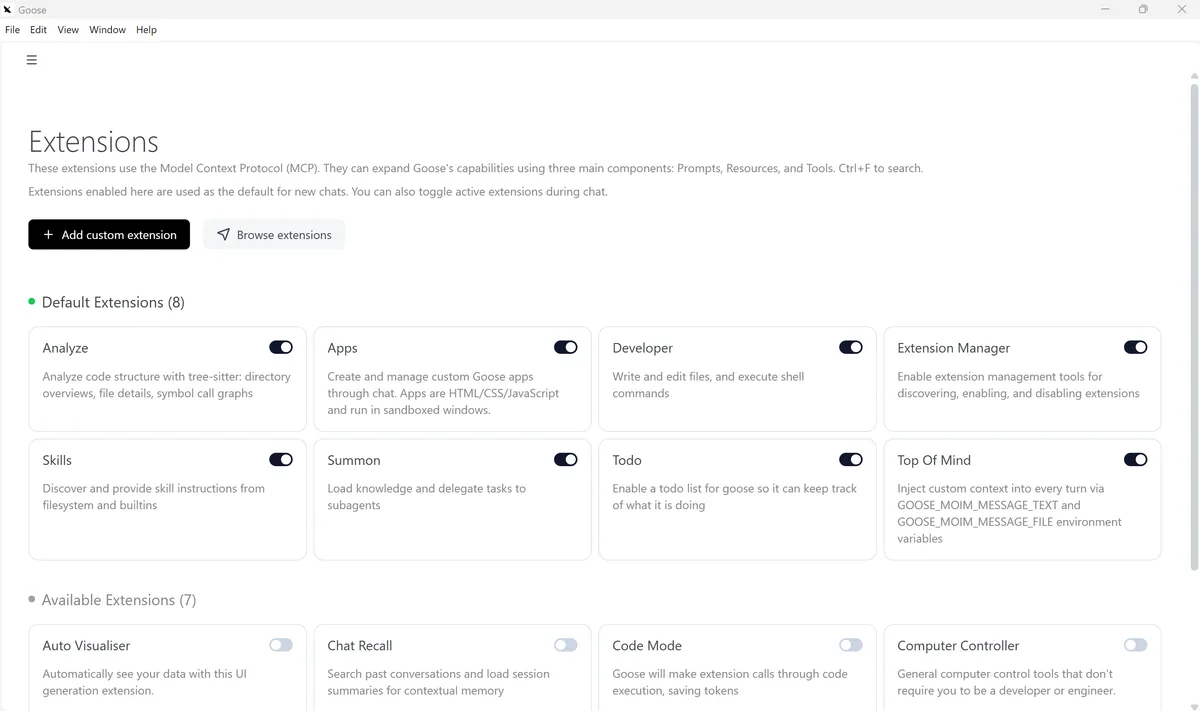
Goose extensions marketplace. Each extension is an MCP server — the same standard you use when building your own.
Skills
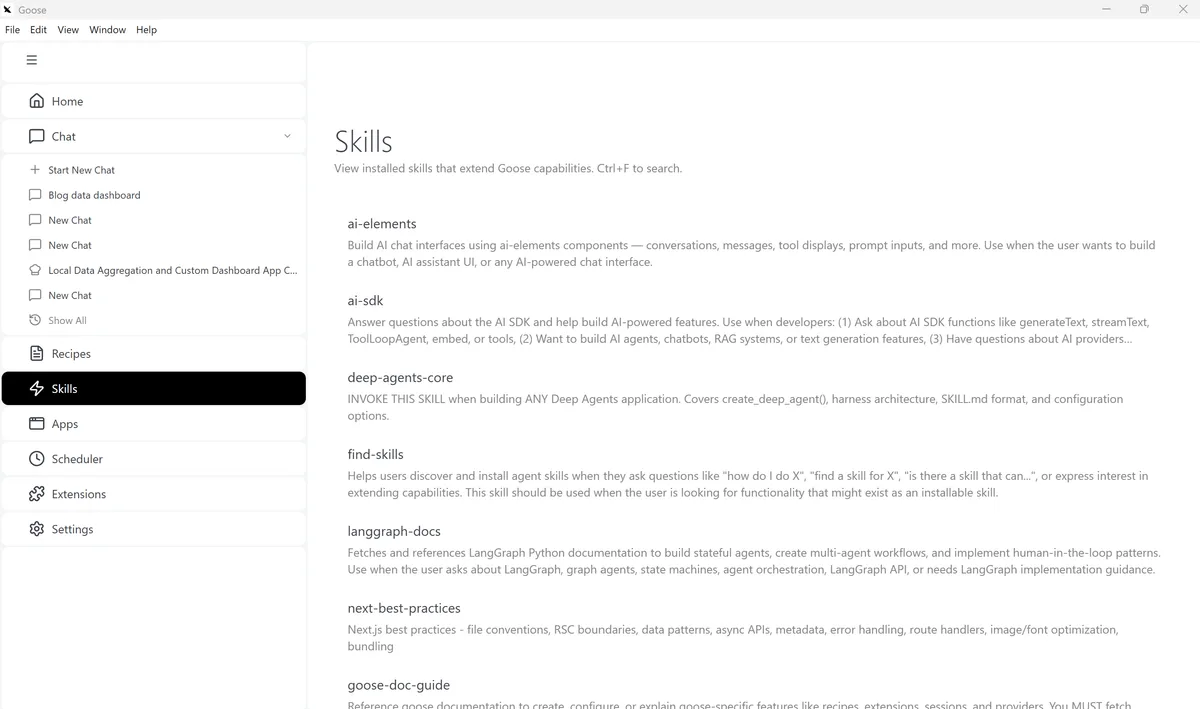
Skills are reusable instruction sets you can attach to a session to shape how the agent behaves. Where extensions give Goose new tools, skills give it domain knowledge and behavioral patterns — things like "always follow this code review checklist" or "use this format when writing reports." You can browse the skills marketplace, install community skills, or write your own.
If you want to go deeper on the skills model, these two articles cover it from the builder's perspective:
Subagents
Most agent frameworks require custom orchestration logic for parallel tasks. Goose handles this natively with subagents — independent agent processes you can spin up from a session. While one subagent reviews your code, another runs the test suite. Results come back independently, without the main session blocking. No custom orchestration code required.
Multi-LLM Support
You can switch LLM providers between sessions without reconfiguring Goose. In practice you might use Claude for complex coding tasks, Gemini for long document analysis, and a local Ollama model when privacy matters. Goose also supports a Mesh LLM Provider, an experimental routing layer that distributes requests across multiple models automatically.
Automation: Recipes and the Scheduler
Recipes: Workflows as Code
Recipes are YAML files that capture a full agent workflow: the instructions, which extensions to enable, and any parameters the user needs to provide. They turn one-off sessions into repeatable, shareable processes.
You can write a recipe by hand, but the faster path is to let Goose generate it from an existing conversation. Once a session produces the result you wanted, click the "Create Recipe" button. Goose analyzes the conversation, extracts the intent, extensions used, and parameters, and pre-fills the recipe form. You review, adjust if needed, and save.
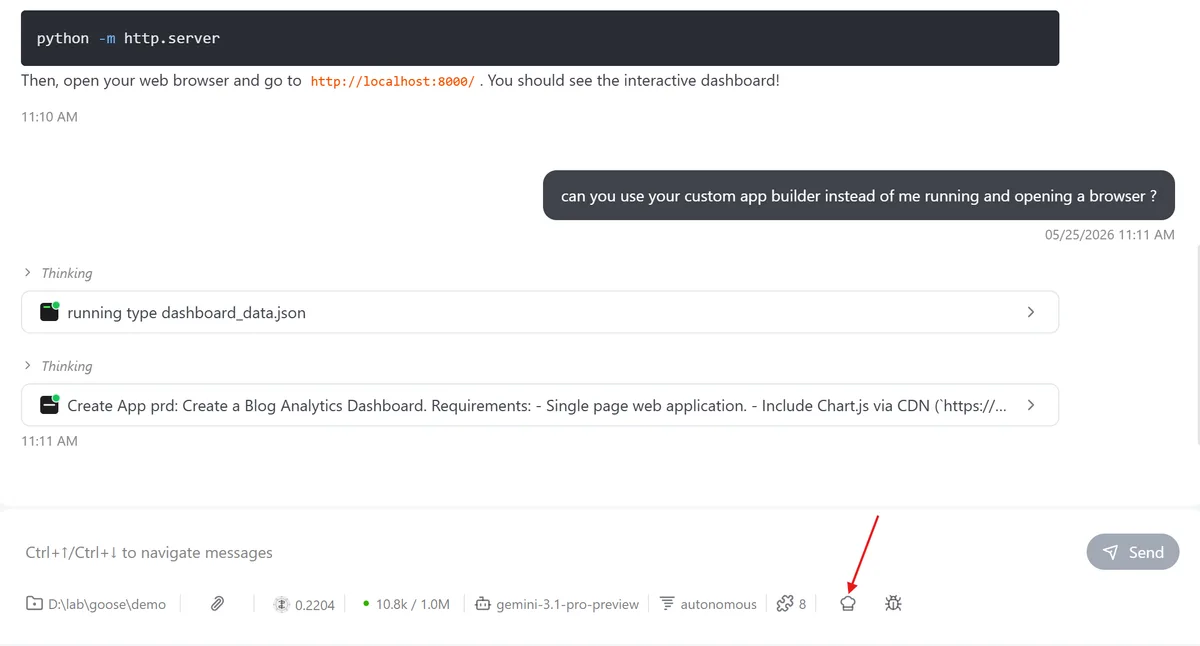
The Create Recipe button appears in an active session, letting you capture the current workflow.
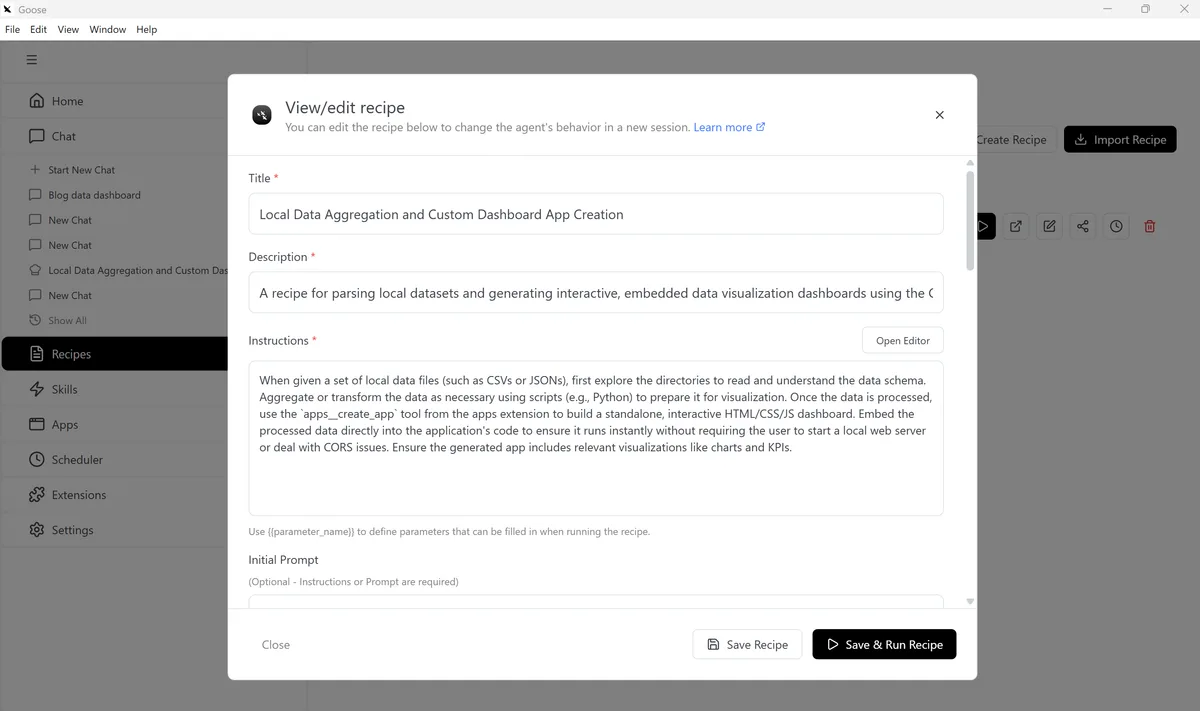
Goose analyzes the session and pre-fills the recipe fields: title, instructions, extensions, and parameters.
The recipe below was generated this way, directly from the dashboard demo earlier in this article:
version: 1.0.0
title: Local Data Aggregation and Custom Dashboard App Creation
description: A recipe for parsing local datasets and generating interactive, embedded data visualization dashboards using the Goose custom apps builder.
instructions: When given a set of local data files (such as CSVs or JSONs), first explore the directories to read and understand the data schema. Aggregate or transform the data as necessary using scripts (e.g., Python) to prepare it for visualization. Once the data is processed, use the `apps__create_app` tool from the apps extension to build a standalone, interactive HTML/CSS/JS dashboard. Embed the processed data directly into the application's code to ensure it runs instantly without requiring the user to start a local web server or deal with CORS issues. Ensure the generated app includes relevant visualizations like charts and KPIs.
extensions:
  - type: platform
    name: apps
    description: Create and manage custom Goose apps through chat. Apps are HTML/CSS/JavaScript and run in sandboxed windows.
    display_name: Apps
    bundled: true
    available_tools: []
  - type: builtin
    name: autovisualiser
    description: Data visualization and UI generation tools
    display_name: Auto Visualiser
    timeout: 300
    bundled: true
    available_tools: []
activities:
  - Aggregate local CSV files
  - Build interactive chart apps
  - Generate KPI dashboards
  - Visualize local data trends
parameters: []
In the desktop app, run a saved recipe by selecting it from your recipe library and clicking run. Goose loads the configuration and starts the session with the defined instructions and extensions already in place. Recipes are also shareable via URL, and Goose ships with a Recipe Cookbook of pre-built starting points for common tasks.
Scheduler
Recipes become even more powerful when combined with the Scheduler. Instead of running a recipe manually, you can schedule it to run at a set frequency — daily, weekly, or on a custom cron schedule. A code review recipe that runs every morning before standup, a data pipeline that refreshes every hour, a weekly report that lands in your inbox automatically. You configure it once in the desktop interface and Goose handles the rest.
A Note on Running Automated Workflows Safely
Any local agent with filesystem and shell access is a potential attack surface. Prompt injection from a malicious webpage or document can instruct the agent to read files or exfiltrate data, and this risk is amplified when recipes run on a schedule without a human in the loop.
Goose ships with prompt injection detection, granular tool permissions, sandbox mode, and an adversary reviewer — but these aren't a substitute for network-level isolation. A pattern gaining traction among developers is running Goose on a dedicated edge device (a Mac Mini is a common choice) rather than a primary laptop. The agent gets its own machine, its own API keys, and network access scoped to what it actually needs. Small operational overhead, meaningful reduction in blast radius.
A Sandbox for New Standards
One underappreciated aspect of Goose is how quickly it adopts emerging agent protocols. MCP support landed early. ACP (Agent Communication Protocol) is already in the codebase. When new standards come out — and they're coming fast — Goose tends to have working support before the major commercial platforms do.
If you want to experiment with what's next in agent tooling without waiting for Anthropic, OpenAI, or Google to ship it, Goose is the fastest path to a working implementation. The official docs track what's current, and the Discord community is where the early experiments happen.
Building on Top of Goose (If You Need To)
Goose is fully open source, and the codebase is designed to be extended. The core is written in Rust, with a TypeScript frontend for the desktop app. If you want to go deeper, the GitHub repository is the place to start.
The most practical extension path is MCP: write an MCP server in any language, the same way you would for Claude Desktop or any other MCP client. The MCP TypeScript SDK guide on this blog covers the pattern in detail. And if you don't need code at all, Recipes often get you there with just YAML.
When Goose Makes Sense (and When It Doesn't)
Good fit:
- Multi-step automation tasks (file processing, batch operations, research pipelines)
- Team workflow sharing via Recipes — everyone runs the same agent behavior
- Scheduled recurring tasks without writing cron jobs or custom scripts
- Tasks that span multiple tools (git + database + browser in one session)
- When you want LLM flexibility and don't want to be locked to one provider
- Experimenting with new agent standards and protocols before they hit commercial tools
Less of a fit:
- You need tight, real-time IDE integration while coding (Cursor or Claude Code is better here)
- Your use case requires highly specialized memory, reasoning loops, or domain-specific context management
- You're building a product where the agent needs to be embedded in your own app with custom UI
The honest answer is that Goose and custom agent frameworks aren't mutually exclusive. Goose is an excellent tool for the operator use case: running agent workflows. Frameworks like LangGraph are better for the builder use case: embedding agent logic in your own product.
Wrapping Up
Most content about AI agents is about building them. That made sense when the tooling was immature. Today, a project like Goose gives you a production-ready agent with security, multi-LLM support, 70+ extensions, and a community of hundreds of contributors, available to install in one command.
Key takeaways:
- Goose is a local-first, general-purpose AI agent for macOS, Linux, and Windows
- Built on open standards (MCP, ACP) with 15+ LLM providers and no vendor lock-in
- Skills and extensions give you building blocks; Recipes and the Scheduler turn them into automated workflows
- It's the fastest place to experiment with new agent protocols before they hit commercial platforms
- The full codebase is open source and designed to extend
Not every agent problem needs a custom solution. Sometimes the right move is to pick up a well-engineered tool, configure it to your workflow, and ship faster.
Is Deploying an Existing Agent the Right Call for You?
Installing Goose is one instance of a broader choice: deploying an open-source agent instead of building one. That's one of four ways to build an AI agent — the path where the community builds, you run it, and the architectural decisions are shared with the project's defaults.
The path breakdown covers what that trade-off demands: how to judge governance rather than star count, which baked-in opinions to check before you commit, and how to plan your extension and ejection path. If you're not sure it's the right path at all, the three-question fitting weighs it against the other three.
Related reading:
AGENT BRIEFINGS
Stay measured as the field moves.
What actually matters for building and scaling AI agents in production — and what's just hype. Straight from the work, no filler.
$ subscribe agent-briefings
→ what works in production, what doesn't.
→ frameworks, MCP, evals, managed services.
→ signal over hype.